What is a realistic screen time New Year resolution?
A small, specific cut that survives your worst day, such as ten minutes less a day on one group of apps, with a plan for the days you go over. Most screen time resolutions fail on a single bad evening, not on willpower overall. Choose the style that matches how your bad days look, then judge it in March, not on January 8.
Pick the resolution that has a plan for the bad day.
How the borrow-and-repay resolution works in 3 steps
- 01Set a daily allowance. Choose the apps, categories and websites with Apple's private picker, then a realistic number, say one hour.
- 02Borrow on purpose. When time runs out, pick 5, 10 or 15 minutes. Time Debt shows today and tomorrow side by side. Nothing happens until you confirm.
- 03Repay tomorrow. Borrowed minutes come off tomorrow's allowance automatically, once. No interest, nothing compounds, and tomorrow never drops below the minimum you set.
Resolution styles compared on January 9
Works if the deleted app was the problem. If not, the time moves to the next app.
Clear, until the night you really need ten more minutes and switch the whole thing off.
Gentle. Easy to stall at week two. Our 4-week taper plan covers it in detail.
The bad night still happens, but it has a visible price: tomorrow starts shorter.
Whichever you choose, Apple's built-in tools are worth setting alongside it. On iOS 27 they are called Time Allowances and Screen Time Schedules, with categories such as Games and Social Media (Apple iOS 27 guide, 2026).
Worked example: one borrow, start to finish
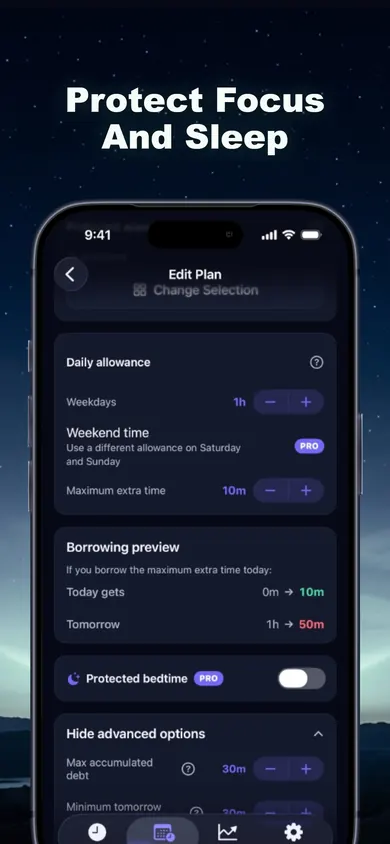
Plan: one hour a day on the apps you picked, maximum extra time 10 minutes.
Tuesday, 9:40 p.m.: the hour is gone and the shield is up. You borrow 10 minutes.
The preview said: today goes from 0m to 10m, tomorrow from 1h to 50m.
You stop after 6 minutes. Ending a borrowed session early returns the unused minutes, so tomorrow loses 6, not 10.
Wednesday: 54 minutes. Repaid once. Thursday is back to a full hour.
Emergency access is always there: you can remove every Time Debt shield until tomorrow, at no cost.
A resolution, told in two Januaries
Picture the same person, the same goal, two different years.
January 2026. "Max one hour of social media." By January 6 the limit popped up, got ignored, popped up again, got ignored. By February the limit was still set and meant nothing.
January 2027. Same hour. On the 6th, a long day ends with a borrowed 15 minutes. Thursday starts with 45. That small, visible cost is the part that makes the next evening's decision different.
A decision we made
No interest on borrowed time. Debt that grows would turn a calm tool into a punishment, so repayment happens once and then stops.
A limit to know
Time Debt is a voluntary commitment tool. On your own iPhone, Screen Time permission can be withdrawn in Settings, so it works with you, not against you. If you want something you truly cannot undo, this is not it.
Screen time resolution questions
What is a good screen time goal for 2027?
One you can keep on a bad day. A specific, modest target (for example, 10 minutes less a day on one group of apps) usually outlasts "half my screen time", because the first busy week does not break it.
How long until a screen time habit sticks?
Longer than January. In a 2010 study in the European Journal of Social Psychology, people took a median of 66 days to reach a steady automatic habit, with a range of 18 to 254 days. Starting January 1, 2027, day 66 is March 8.
Is cold turkey better than cutting down slowly?
It depends on the shape of your use. If one app is most of the problem, removing it can be the simplest rule. If your use is spread across the day, a gradual cut or a flexible limit is easier to live with.
Why do I keep ignoring my iPhone limits?
Partly design: by default, Screen Time limits can be ignored once reached, according to Apple's iOS 26 guide (2026). A limit with a way past it and no cost tends to become a suggestion.
How does borrowing time work in Time Debt?
When your allowance runs out you can borrow 5, 10 or 15 minutes, or a custom amount within your cap. Time Debt shows today, tomorrow's normal allowance and tomorrow's adjusted allowance before you confirm, and repays it automatically the next day, once, with no interest.
Is Time Debt free?
The core plan is free: one full plan with real blocking, borrowing, automatic repayment, 7-day history and emergency access. Time Debt Pro adds multiple plans, custom schedules, multi-day repayment, longer history, guided programs and expanded family tools.
Start on your iPhone before January 1
Set the plan on December 31 and let the first borrow teach you more than any promise.

Start Time Debt on your iPhone
Updated November 2026
Related
- Time Debt: borrow screen time from tomorrow, on purposeTime Debt blocks apps at your daily limit. Want more? Borrow 5, 10 or 15 minutes and tomorrow starts that much shorter. Free core plan on iPhone.
- Screen time per year calculator: your 2027 in daysEnter your daily screen time and scratch to see how many days of 2027 your phone gets, shaded on a real 2027 calendar. Free, nothing saved.
- App Limits vs Downtime: which to use, and your first weekApp Limits cap how long, Downtime caps when. Play a 20-second day with each, then follow a 7-day first week. iOS 26 and iOS 27 checked.
- What happens when you ignore a Screen Time limitIgnore Limit, One More Minute, Remind Me in 15: what each one does on iPhone, who sees it, and a free 3-tap check of what your habit costs.