How do you reduce screen time gradually?
Set this week's limit just under what you really use, lower it about 10% a week for four weeks, and decide in advance how you will handle the nights you go over. A taper works where a detox often does not, because nothing on day one asks you to give up the phone you still need for work, family and maps.
The part most plans skip is the bad night. Cold-turkey plans have no answer for it, so one 1 AM scroll becomes "I failed" and the whole thing stops. This challenge builds the answer in: a small, capped amount you can borrow, paid back the next day.
Plan the slip, and the slip stops being the end of the plan.
Gradual screen time reduction: common questions
How do I reduce screen time gradually?
Start from your real number, not a goal. Set this week's limit just under what you use now, then lower it a little each week for four weeks. Keep a small, planned way to get extra time so one bad night does not end the plan.
Is cold turkey or gradual better for cutting screen time?
It depends on the person. A full detox can work for a weekend away. For everyday phone use, a step-down plan is easier to keep because you never jump straight from four hours to zero while work, family and maps still live on the phone.
How much should I cut screen time each week?
A simple rule is about 10% of your starting time per week, so 3 hours a day becomes about 2 hours by week four. The plan on this page uses that rule; you can be gentler.
What if I go over my limit one day?
Plan for it. In Time Debt you can borrow 5, 10 or 15 minutes, or a custom amount within your cap, and tomorrow's allowance starts that much shorter. Borrowed minutes are repaid once, with no interest, and tomorrow never drops below the minimum you set.
Which apps should I limit first?
The ones you open without deciding to. Time Debt lets you choose apps, categories and websites with Apple's private picker, so you can start with one category, such as social, and leave messages and maps alone.
Is Time Debt free?
The core plan is free: one full plan with real blocking, borrowing, automatic repayment, 7-day history and emergency access. Time Debt Pro adds multiple plans, custom schedules, multi-day repayment, longer history, reports and guided programs.
Cold turkey vs taper vs ignoring the limit
Cold turkey
Day 1: 0 minutes
Clear and dramatic. Breaks the first time work, a group chat or a map needs the phone, and there is no plan for that.
Ignore the limit
Day 1: limit, then tap past it
No pain at all, which is the problem. Tomorrow's limit is the same, so tonight's extra hour costs nothing.
The taper
Day 1: just under today's real use
Feels almost too easy in week one. That is the point: the habit of stopping comes first, the lower number second.
Honest limits
- Borrowing is a nudge, not a wall. Emergency access removes every Time Debt shield until tomorrow, free, at any time. Time Debt cannot force you, by design.
- The 10% rule is ours, a simple step size we chose for this plan, not a clinical guideline. Gentler is fine.
- Some extras are Pro. The core plan covers one plan, blocking, borrowing and 7-day history. Custom schedules, multi-day repayment, longer history and guided programs are Time Debt Pro.
- It is a commitment tool, not medical or psychological treatment. On your own iPhone, Screen Time permission can be withdrawn in Settings.
Your 28-day screen time challenge, from the cards above
Plan for a starting point of 3h a day:
| Days | Daily allowance | Max borrow | This week's one job |
|---|
Set the "minimum tomorrow" in Time Debt to your week 4 number, so borrowing can never push a day below your goal.
How it works in 3 steps (a screenshot tour)
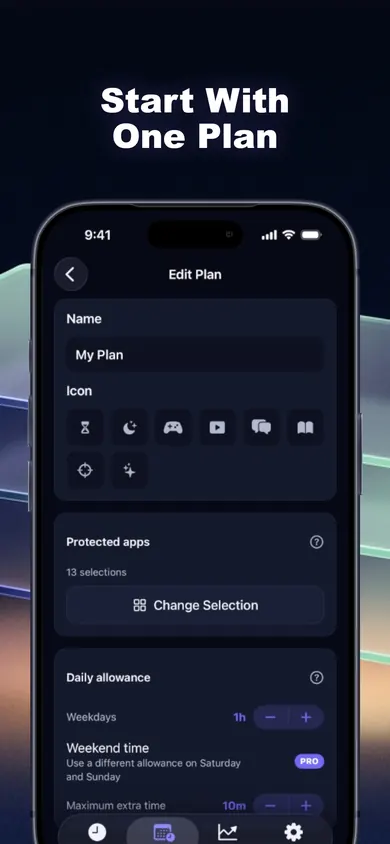 1
Pick the apps and set week 1
Choose apps, categories or websites with Apple's private picker. Time Debt never sees the app names; Apple hands it anonymous tokens. Set the daily allowance to your week 1 number.
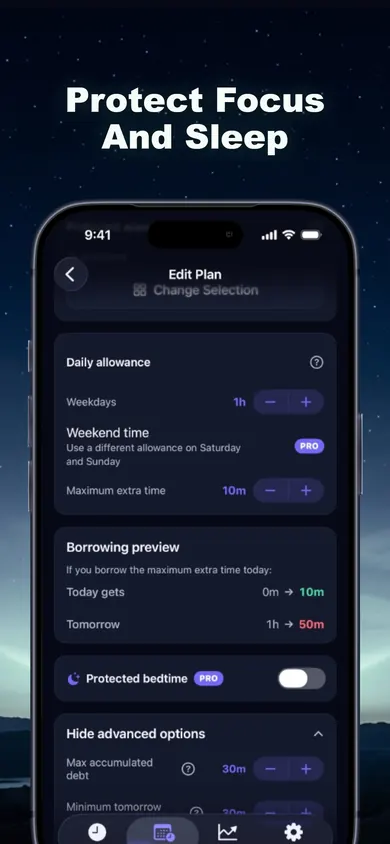 2
Cap the borrowing
Set a maximum extra time (the screenshot shows 10 minutes) and a minimum for tomorrow. The borrowing preview shows exactly what tonight's extra minutes cost before you confirm.
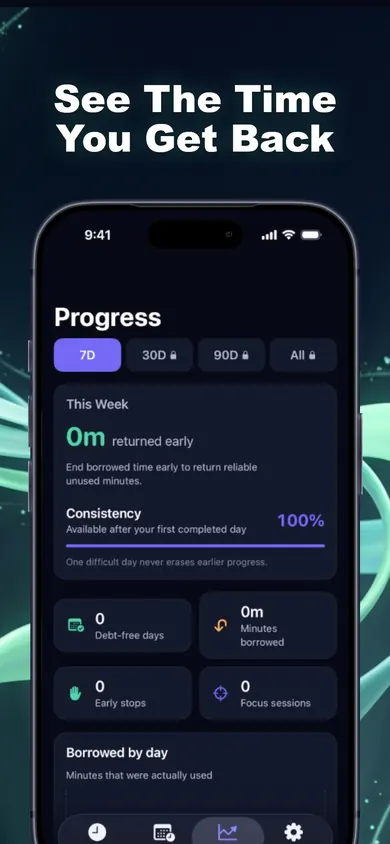 3
Lower it every Monday
Open the plan, drop the allowance to next week's number. Progress shows debt-free days, minutes borrowed and early stops, labelled plainly and never framed as failure.
A mini story: day 17
Week 3, allowance 2h 05m. It is 10:50 PM and the shield appears halfway through a thread. Old plan: tap past it, feel bad, quit the challenge on day 17 like last time. Taper plan: borrow 10 minutes. The preview says tomorrow drops to 1h 55m. Fine. The thread ends at 10:56, the borrowed session is ended early, and the unused 4 minutes come back.
Day 18 is a little shorter. Day 19 is normal again. The challenge is still alive on day 28, which is more than the cold-turkey version managed.
A scenario we wrote, not a user's story.
One design decision: repayment happens once and never compounds. A plan that punishes you for one late night is a plan you delete. Pick something else if you want a block with no way around it, or remote monitoring of a child's phone; Time Debt has neither.
Get Time Debt free
Set week 1 tonight. Get Time Debt free on the App Store and start the taper on Monday.

Updated November 2026
Related
- Time Debt: borrow screen time from tomorrow, on purposeTime Debt blocks apps at your daily limit. Want more? Borrow 5, 10 or 15 minutes and tomorrow starts that much shorter. Free core plan on iPhone.
- Opal vs Screen Time (and a third option)Opal vs Apple Screen Time, compared at the moment your limit runs out, plus a third way that makes extra time cost tomorrow. Checked Nov 2026.
- A screen time app for college students that lets you borrow, not cheatA free screen time app for college students that lets you borrow 10 minutes from tomorrow instead of ignoring your limit. Pick your situation, see a plan.
- What's a good screen time limit for adults? Six myths, then your numberThere's no official daily screen time number for adults. Bust six myths, play a 20-second borrowing game, then set a limit you'll actually keep.