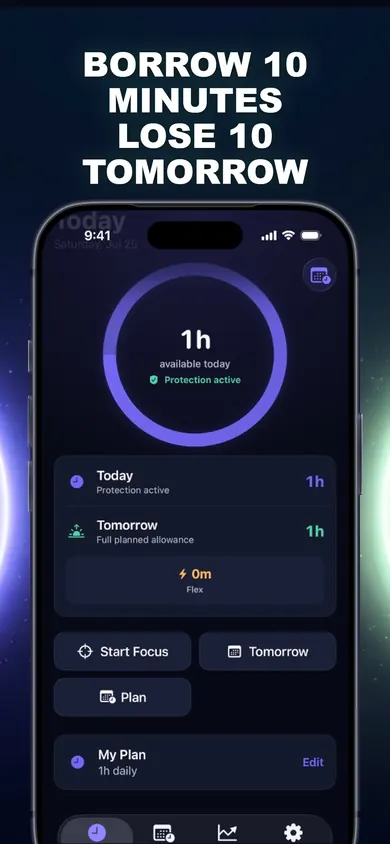
Play a 20-second evening, borrow if you must, and see what tomorrow pays.
Today
60m
Tomorrow
60m
Limit reached.
20 seconds = one evening. Your allowance is 60 minutes.
Free on iPhone
What is a good screen time limit for adults?
There is no official daily screen time limit for adults, so a good one is a number close to your real average for the apps you want less of, set so it runs out before bedtime, with a small, visible cost for going over. The well-known screen-time numbers from the WHO (2019) are for children under 5. For grown-ups, the useful question is which hours you want back.
Screen time for adults: 6 myths vs facts
Myth 1There's an official healthy screen time limit for adults.
FactThe WHO's 2019 guidelines set screen-time numbers for children under 5, such as no more than 1 hour of sedentary screen time for 2-year-olds. We found no WHO, CDC or NHS daily number for adults.
Myth 2Your iPhone stops you when you hit your limit.
FactNot by default. On iOS 26 and earlier, Apple says Screen Time limits can be ignored once reached unless you set a passcode and turn on blocking. Apple Support.
Myth 3The only good limit is close to zero.
FactIn a 2015 study, 124 adults who limited email to three checks a day, not zero, reported lower daily stress than in a week of unlimited checking. Fewer, chosen sessions beat a ban you can't keep.
Myth 4Every day needs the same limit.
FactApple's iOS 26 App Limits let you customize days, and Time Debt supports separate weekday and weekend allowances. Saturday isn't Tuesday.
Myth 5Screen time and sleep are separate problems.
FactThe CDC (2024) lists 7 or more hours of sleep for adults aged 18 to 60. If your limit runs out after midnight, it's protecting the wrong hours.
Myth 6Going over once means the plan failed.
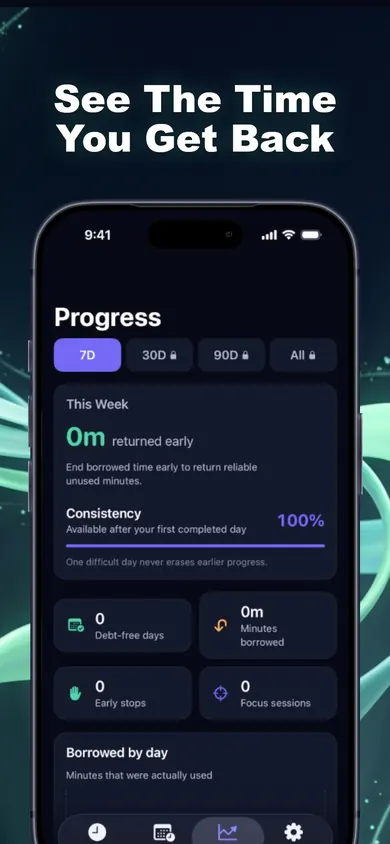
FactIn Time Debt, extra time is borrowed and repaid once, with no interest. History shows borrowed and repaid minutes plainly, never framed as failure.
The number matters less than what happens when you reach it.
How Time Debt turns a limit into a ceiling, in 3 steps
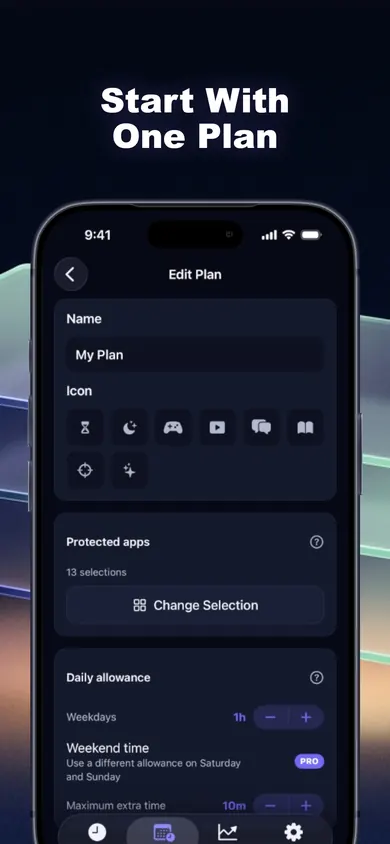
Set a realistic daily allowance for the apps, categories and websites you pick with Apple's private picker.
At the limit, a calm shield appears. Stop for today, or open Time Debt and borrow 5, 10 or 15 minutes, seeing tomorrow's adjusted allowance before you confirm.
Tomorrow repays it automatically, once, never twice. It never drops below the minimum you choose.
Honest limits
Time Debt can't tell you the "right" number. Nobody can; that's myth 1.
Emergency access removes every Time Debt shield until tomorrow, free, at any time. We built that in deliberately: a tool that traps you in an emergency is a tool you'll uninstall.
It doesn't change Screen Time limits set in iOS Settings or by a Family Sharing organizer.
The free core plan is one plan with 7-day history. Multiple plans, custom schedules and longer history are Pro.
Who should pick something else: if you never ignore your limits, Apple's free Screen Time already does the job.
Worked example: picking your first number
Use Apple's own report first: in Settings, Screen Time shows a daily average and weekly summary, per Apple Support. Then turn it into a plan.
Step
Example
Last week's average on social and video
2 h 30 min a day
First allowance (a little under)
2 h
Most you can borrow in a day
15 min
Tomorrow never drops below
1 h
Week 2 check
Borrowed most nights? Keep 2 h. Rarely? Try 1 h 45.
The point isn't the 2 hours. It's that going over now costs something you can see.
Adult screen time limit: questions
How many hours of screen time is healthy for an adult?
No major health body publishes a daily screen time number for adults. The WHO's 2019 guidelines give screen-time numbers for children under 5. For adults, a practical approach is to protect sleep and activity first and set a limit on the apps that crowd them out.
Does work screen time count?
Count what you want less of. Most people set a limit on social, video and games, not on email or documents. Time Debt only shields the apps, categories and websites you choose.
Is 4 hours of screen time a day too much for an adult?
It depends on what the hours are and what they replace. Four hours of work plus a film is a different day from four hours of scrolling past midnight. Look at your own week before picking a number.
Can I set different limits on weekends?
Apple's iOS 26 App Limits let you Customize Days. Time Debt supports different weekday and weekend allowances; in the app's own screenshots, weekend time is marked Pro.
What should I set as my first limit?
Start near your real average for the apps you want less of, minus a little. A limit you hit every night at 9 p.m. trains you to ignore it. You can tighten it in week two.
Is Time Debt free?
The core plan is free: one plan with real blocking, borrowing, automatic repayment, 7-day history and emergency access. Pro adds multiple plans, custom schedules, multi-day repayment and longer history.
Proof: the ceiling, on screen
Today and tomorrow, one screen.One plan: apps, allowance, maximum extra time."One difficult day never erases earlier progress."
A mini story: 10:50 p.m., episode three
The allowance runs out mid-episode. Old habit: tap past it, finish the season at 1 a.m. New version: the shield appears, you open Time Debt, and the screen says today gets 10 more minutes, tomorrow drops from 2 hours to 1 hour 50. You borrow. The episode ends at 11:02. You stop, partly because the next one would cost another 10 from a day you haven't had yet.
Opal vs Screen Time (and a third option)Opal vs Apple Screen Time, compared at the moment your limit runs out, plus a third way that makes extra time cost tomorrow. Checked Nov 2026.