What's the best screen time app for college students?
The best screen time app for a college student is one that bends on a heavy night but makes the cost visible: Time Debt lets you borrow 5, 10 or 15 minutes from tomorrow's allowance instead of ignoring your limit, and its core plan is free. Apple's Screen Time is free too, and for some of you it's enough. Read on before you download anything.
Dear student,
You probably already set a limit once. Maybe in September, maybe the night before a midterm. Then the limit arrived at 11:52 p.m., mid-video, and a button offered you a few more minutes for nothing. You took them. Then you took them again. By November the limit is a speed bump you don't notice.
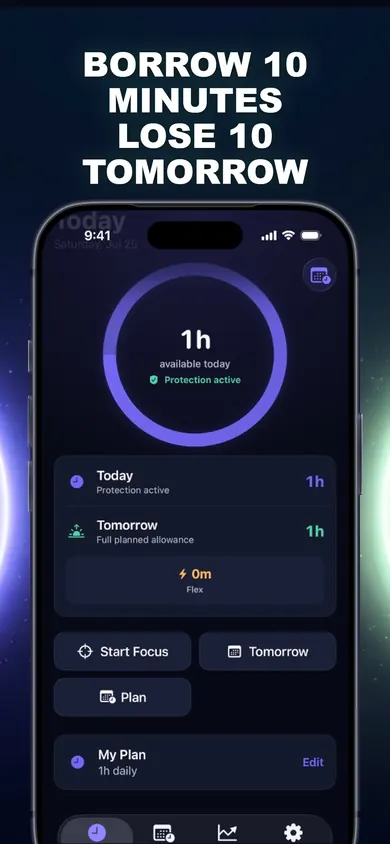
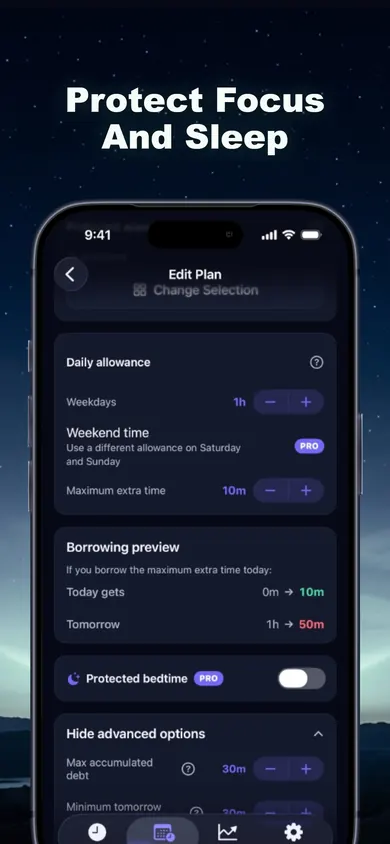
We built Time Debt for that exact moment. When your allowance runs out, a calm shield covers the apps you picked. If you really want more, you borrow it, and before you confirm, the app shows today, tomorrow's normal allowance and tomorrow's adjusted allowance side by side. Borrow 10 minutes tonight and tomorrow starts 10 minutes shorter. No interest, nothing compounds, and tomorrow never drops below the minimum you set.
A limit you can skip for free isn't a limit. A limit you can borrow against is a decision.
Honest limits first
- Emergency access is always there: you can remove every Time Debt shield until tomorrow, free. We made that choice on purpose, because you might need your phone in a real emergency. It also means Time Debt is a commitment tool, not a cage.
- On your own iPhone, Screen Time permission can be withdrawn in Settings. A student who wants out can get out.
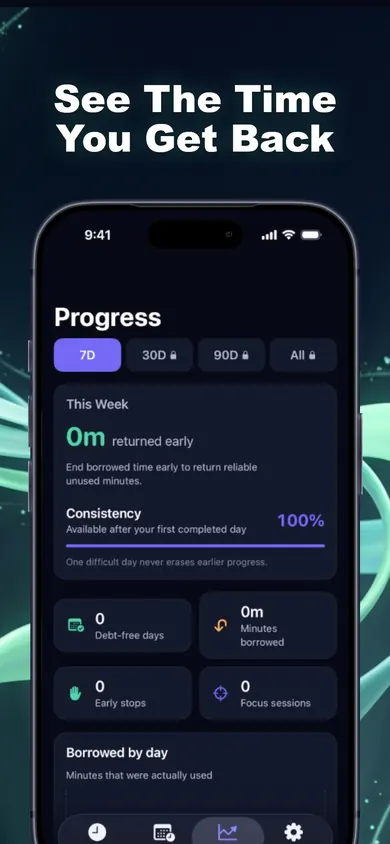
- The free core plan is one plan. Multiple plans, custom schedules, multi-day repayment and longer history are Time Debt Pro. In the app's screenshots, a separate weekend allowance and protected bedtime are marked Pro.
- It's iPhone only. Your laptop is still your laptop.
Screen time app for students: questions
Is there a free screen time app for students?
Yes. Apple's built-in Screen Time is free on every iPhone. Time Debt's core plan is also free: one full plan with real blocking, borrowing, automatic repayment, 7-day history and emergency access.
How much screen time should a college student have?
There's no official number for adults. A more useful anchor is sleep: the CDC (2024) lists 7 or more hours a night for adults aged 18 to 60. Set your allowance so your phone isn't eating that.
Can I block apps during exam week only?
You can start a focus session in one tap for study, and selected apps stay shielded while the timer runs. Custom schedules for specific dates are part of Time Debt Pro.
What if I need an app for a class?
Only the apps you choose get a shield. Leave your course app, email and maps out of the plan. You can also remove every Time Debt shield until tomorrow at any time, at no cost.
Will my parents see my screen time?
Not through Time Debt. There's no account and no remote monitoring; your rules and history stay on your iPhone. Limits a Family Sharing organizer set in iOS Settings are separate and unchanged.
Does Time Debt work on Android or a laptop?
No. It's an iPhone app built on Apple's Screen Time system.
How Time Debt works in 3 steps
- Set your limit. Pick distracting apps, categories and websites with Apple's private picker, then set a realistic daily allowance. Be honest: a 30-minute allowance you'll blow through is worse than 90 you'll keep.
- Borrow deliberately. Out of time? Pick 5, 10 or 15 minutes, or a custom amount within your cap. Nothing happens until you confirm.
- Repay tomorrow. Borrowed minutes come off tomorrow automatically, once. End a borrowed session early and the unused minutes come back.
Proof: the plan you'd actually build
Who should pick something else
If your parents manage your phone with Family Sharing, Time Debt won't change those limits; it doesn't touch Screen Time limits set in iOS Settings or by a Family Sharing organizer. Talk to them instead.
If you want a hard lock with no exit, for example during a take-home exam, give a friend your Screen Time passcode and use Apple's tools. Time Debt always keeps a free way out.
If a simple daily budget works for you, stay with Apple. On iOS 27 those budgets are called Time Allowances, per Apple Support, and they're free and already on your phone.
Borrowing vs the other student options
| Time Debt | Apple Screen Time | Deleting the app | |
|---|---|---|---|
| At the limit | Shield; stop or borrow | Reminder; blocking needs a passcode | Nothing to open |
| Extra time costs | Minutes off tomorrow | Nothing, by default | A reinstall |
| Shows the trade-off | Yes, before you confirm | No | No |
| Price | Free core plan; Pro optional | Free, built in | Free |
Yours, from the studio that makes Time Debt. Good luck with finals.
Get Time Debt free
Set one honest plan before finals start. Time Debt on the App Store.

Updated November 2026
Related
- Time Debt: borrow screen time from tomorrow, on purposeTime Debt blocks apps at your daily limit. Want more? Borrow 5, 10 or 15 minutes and tomorrow starts that much shorter. Free core plan on iPhone.
- Opal vs Screen Time (and a third option)Opal vs Apple Screen Time, compared at the moment your limit runs out, plus a third way that makes extra time cost tomorrow. Checked Nov 2026.
- How to reduce screen time gradually: 4-week taperA 28-day plan to cut phone time step by step instead of quitting cold turkey. Tap to reveal your weekly limits, then set them on iPhone.
- What's a good screen time limit for adults? Six myths, then your numberThere's no official daily screen time number for adults. Bust six myths, play a 20-second borrowing game, then set a limit you'll actually keep.