Is Opal better than Screen Time?
Opal is stricter and does more than Screen Time, but the real difference is what happens at the limit: Screen Time reminds you, Opal can wall you off, and Time Debt makes extra minutes cost tomorrow. Pick by the moment you usually fail, not by the feature list.
Opal says on its help page that it is built on top of the iOS Screen Time API, and that Screen Time's restrictions are "extremely easy to bypass and remove". That is fair for limits you set on your own phone: the person setting the rule is the same person tapping past it at 11 PM. Opal's answer is a stricter wall. Ours is a price.
A limit that costs nothing gets ignored. A limit you can never leave gets deleted.
Opal vs Screen Time vs Time Debt, side by side
| Apple Screen Time | Opal | Time Debt (ours) | |
|---|---|---|---|
| Price | Free, built in | Free download; plans $4.99/week to $99.99/year (US listing) | Core plan free; Pro optional |
| When the limit runs out | Limit screen; on your own phone you can usually keep going | Block screen; strictness is adjustable | Shield; stop, or borrow from tomorrow |
| Strictest mode | Passcode-protected limits | Deep Focus: "can't bypass or cancel" | Protected hours that can cross midnight |
| Cost of extra time | None | Breaks with an intention and a timer | The same minutes come off tomorrow |
| Emergency exit | Settings | Not in Deep Focus | Remove all shields until tomorrow, free |
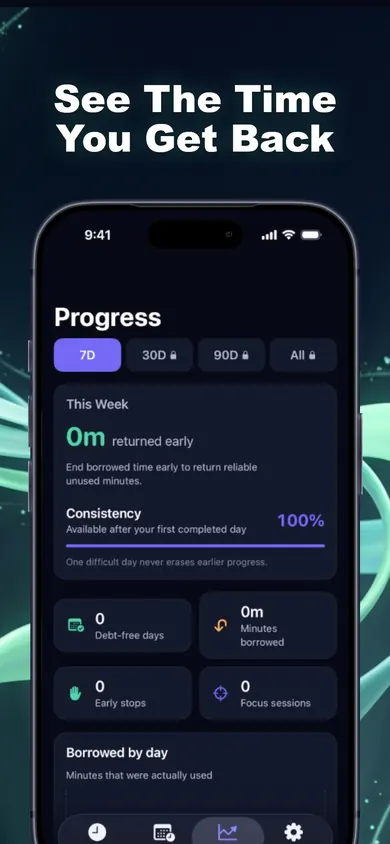
| Stats | Daily and weekly usage | Focus Score, reports, leaderboards | Borrowed, repaid, early stops |
Opal details from Opal's App Store listing (developer site: opal.so) (Opal: Screen Time Control, iOS 18 or later) and Opal's own help page, checked November 3, 2026. Screen Time behaviour from Apple's iPhone User Guide. We make Time Debt, so weigh our row accordingly.
Opal vs Apple Screen Time: the questions people actually ask
Does Opal count screen time the same way as iPhone?
No. Opal's help page says it counts only time inside apps and websites, while Apple counts time on the Home Screen as active. So if Opal says 3 hours and Settings says 3 hours 40, both can be right.
Do I need Opal if I already have Screen Time?
Not if Screen Time's reminder is enough for you. If you keep tapping past it, you need something that changes the moment: a stricter block, or a cost. Screen Time alone is the right answer for many people, and it costs nothing.
Which one is strictest?
Opal's Deep Focus, by its own description: the listing calls it the maximum protection level, one you "can't bypass or cancel". Time Debt deliberately is not that strict. Emergency access always works.
Honest limits of each, ours included
- Screen Time: free and already on your phone, but a limit you set for yourself is easy to wave through.
- Opal: the most features of the three. Its listing does not spell out which are free and which need a plan, and Deep Focus is strict by design, which is either the point or the problem.
- Time Debt: borrowing is a nudge, not a wall. If you borrow every night, tomorrow keeps getting shorter until it hits the minimum you chose, and then it stops dropping. Emergency access removes every shield until tomorrow at no cost. That is on purpose, and it also means Time Debt cannot force you.
- All three run on Apple's Screen Time frameworks. Time Debt does not change limits set in iOS Settings or by a Family Sharing organizer.
One design decision we made: no interest. Borrow ten minutes, repay ten minutes, once. We tried compounding in a prototype and it felt like a punishment app.
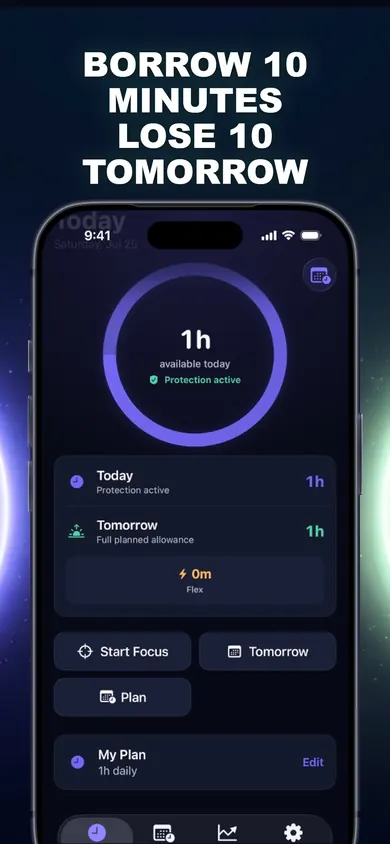
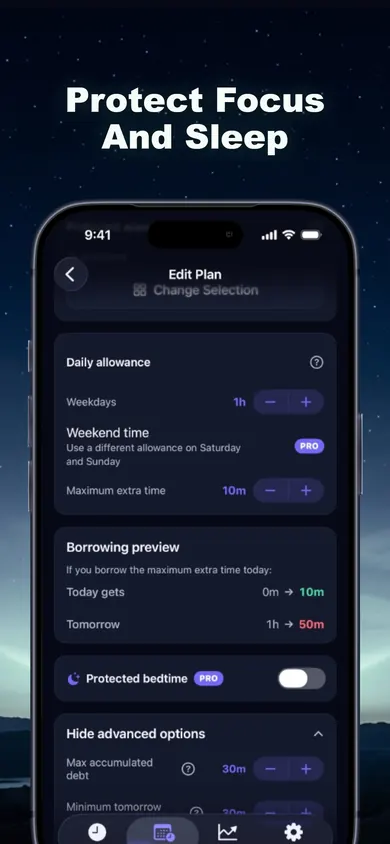
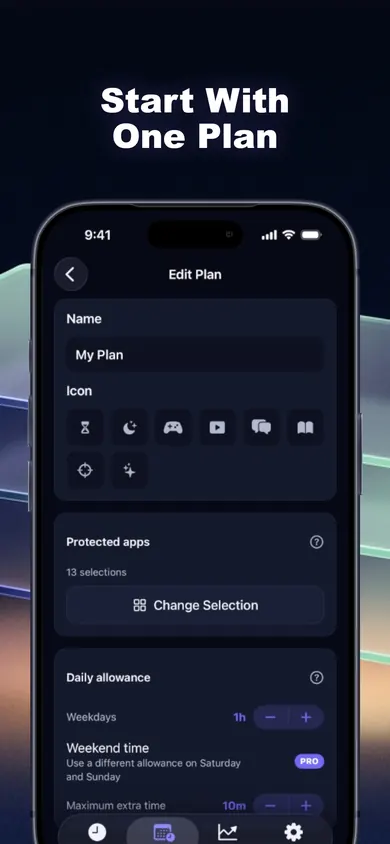
Proof: Time Debt's borrowing preview
A mini story: one Tuesday, three tools
With Screen Time
The video app limit hits at 10:40. "Ignore limit." 10:41, 11:20, 12:05. Wednesday's limit is exactly the same, and so is Wednesday night.
With Opal
A Deep Focus session is running until 7 AM, so there is no way in. Great on Tuesday. On Thursday a group chat needs a real reply, the session is in the way, and the temptation is to stop scheduling them.
With Time Debt
The shield appears at 10:40. Borrow 10 minutes? The preview says tomorrow drops from 1h to 50m. Fair trade, confirmed. At 10:46 the episode ends, the borrowed session is ended early, and the 4 unused minutes go back.
A scenario we wrote to compare the tools, not a user story.
Who should pick what
- Pick Screen Time if a reminder is enough, or you are setting limits on a child's device through Family Sharing.
- Pick Opal if you want the strictest possible block, focus scores and leaderboards, and you are fine with a paid plan.
- Pick Time Debt if you keep tapping past limits but walls make you quit the app entirely. The core plan is free.
- Time Debt is not for anyone who needs a block they truly cannot leave, anyone on Android, or anyone who wants remote monitoring of another phone (there is none).
Opal vs Screen Time FAQ
Is Opal better than Screen Time?
It is stricter and has more features, not automatically better. Opal adds sessions, a Focus Score, breaks with an intention, and a Deep Focus mode its listing says you can't bypass or cancel. Screen Time is free, built in, and simpler. The right one depends on whether you need a hard wall or just a reminder.
Is Opal free?
Opal is free to download with in-app purchases. On November 3, 2026 its US App Store listing showed plans from $4.99 a week to $99.99 a year. The listing does not itemize which features are free and which need a paid plan, so check inside the app before you rely on one.
Does Opal use Screen Time?
Yes. Opal's help page says it is built on top of the iOS Screen Time API. Time Debt and most iPhone blockers use the same Apple frameworks; they differ in what happens when you hit a limit.
Why is Opal's screen time different from iPhone Screen Time?
Opal's help page says it counts only time inside apps and websites, while Apple counts time on the Home Screen as active Screen Time. So the two numbers rarely match.
Can you get around Screen Time limits?
On your own iPhone, usually yes: a limit you set for yourself can be ignored or changed in Settings. That is the gap blockers like Opal and Time Debt try to fill in different ways: Opal with stricter modes, Time Debt by making extra time cost tomorrow's allowance.
What does Time Debt do differently?
When your allowance runs out you can borrow 5, 10 or 15 minutes (or a custom amount within your cap), and tomorrow's allowance starts that much shorter. It shows today, tomorrow's normal allowance and tomorrow's adjusted allowance before you confirm. Repayment happens once, with no interest.
Is Time Debt free?
The core plan is free: one full plan with real blocking, borrowing, automatic repayment, 7-day history and emergency access. Time Debt Pro adds multiple plans, custom schedules, multi-day repayment, longer history and guided programs.
Open Time Debt in the App Store
Set one plan, borrow when you mean it, see tomorrow before you do. Open Time Debt in the App Store.

Updated November 2026
Related
- Time Debt: borrow screen time from tomorrow, on purposeTime Debt blocks apps at your daily limit. Want more? Borrow 5, 10 or 15 minutes and tomorrow starts that much shorter. Free core plan on iPhone.
- Why app blockers don't work, and what to try insteadMost app blockers fail at the moment you want more time. We compare how Screen Time, one sec, Opal, ScreenZen and Time Debt handle it. Checked Nov 2026.
- App Limits vs Downtime: which to use, and your first weekApp Limits cap how long, Downtime caps when. Play a 20-second day with each, then follow a 7-day first week. iOS 26 and iOS 27 checked.
- What happens when you ignore a Screen Time limitIgnore Limit, One More Minute, Remind Me in 15: what each one does on iPhone, who sees it, and a free 3-tap check of what your habit costs.