Enter your daily average, scratch the ticket, and see how much of 2027 your phone gets.
Scratch to see 2027
Free on iPhone · core plan free
How many days a year do you spend on your phone?
Multiply your daily screen time by 365 and divide by 24: at 4 hours a day that is 1,460 hours, or about 61 full days of 2027, the whole of January and February. Counted against waking hours (we assume 16 a day), it is closer to 91 waking days, roughly one in four.
The calendar below shades those days from 1 January, so the number turns into something you can point at. Move the slider above and it redraws.
Your phone's share of 2027
30 mincut per day returns about 7.6 days over 202710 minborrowed every day and never repaid adds up to about 61 hours a year
How Time Debt keeps the year on budget
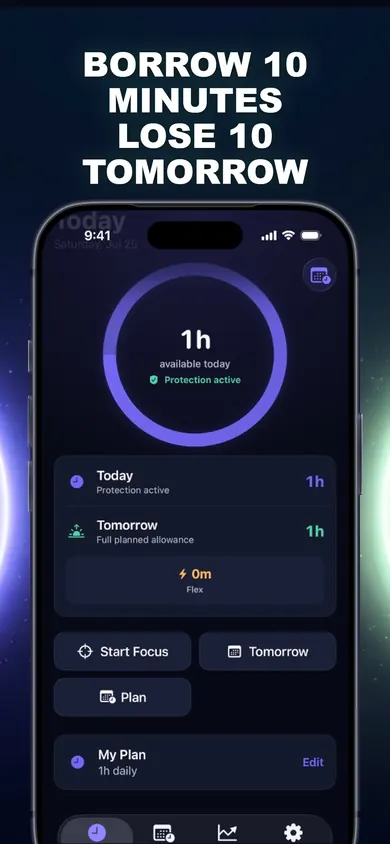
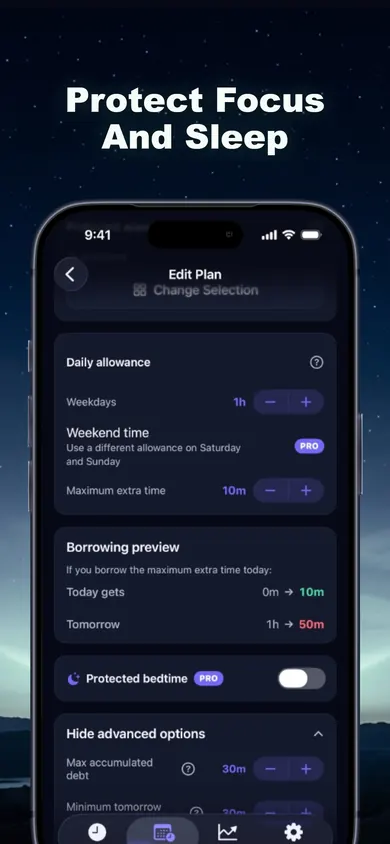
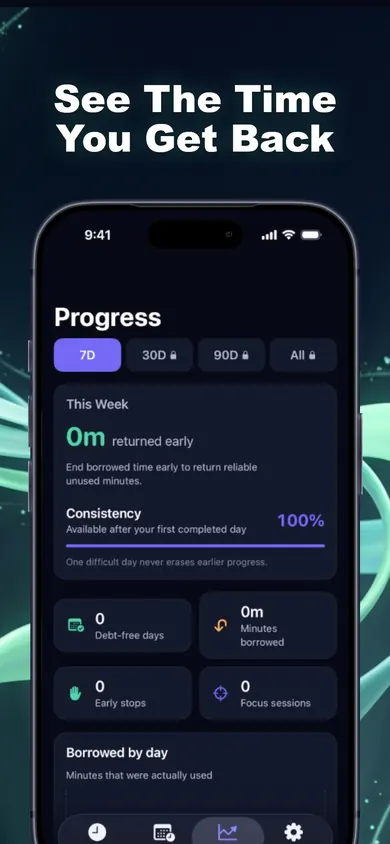
Store screenshots, annotated by us. The marker notes are ours, not part of the app.
One daily allowance for the apps you choose.
The borrowing preview shows tomorrow's cut before you confirm.
History labels borrowed and repaid minutes, never as failure.
Who this is not for
You want a total ban. Time Debt is built around a daily allowance and planned borrowing. If you want an app gone completely, delete it.
You want remote parental monitoring. There is none. Family tools work on one shared or handed-over iPhone.
You only want the number. Then this calculator is enough, and your iPhone's Screen Time page already tracks the daily average for free.
2027 at four daily budgets
Same 365 days, four daily budgets. Full 24-hour days, rounded.
5 h76 daysto mid-March
4 h61 daysto 2 March
3 h46 daysto mid-February
2 h30 daysto 31 January
Going from 4 hours to 3 is worth about 15 days. That is a better first resolution than going from 4 to 1, which sounds great on 1 January and rarely survives the second week.
How it works in 3 steps
Set your limit. Pick distracting apps, categories and websites in Apple's private picker and set a daily allowance a little under your current average. A different weekend allowance is available too (marked Pro in the plan screen).
Borrow deliberately. Out of time? Choose 5, 10 or 15 minutes, or a custom amount within your cap. You see today, tomorrow's normal allowance and tomorrow's adjusted allowance side by side before anything happens.
Repay tomorrow. Borrowed minutes come off tomorrow automatically, once. No interest, nothing compounds, and tomorrow never drops below the minimum you choose.
One honest limit: emergency access removes every shield until tomorrow, free, any time. It is a commitment tool you agree to, not a cage.
Screen time per year: questions
How do I calculate my screen time per year?
Multiply your daily average by 365, then divide by 24 for full days. Four hours a day is 1,460 hours, which is about 61 days of 2027. Divide by your waking hours instead (16 is a common assumption) to see how many waking days that is.
Where do I find my daily average on iPhone?
Open Settings, then Screen Time. The activity view shows a daily average for the week. Use a normal week, not a holiday one, for the calculator.
Is a smaller number always the goal?
No. Hours spent on a video call with family or reading a book on your phone count the same here. The calculator measures size, not value; decide for yourself which part of the number you want back.
What is a realistic New Year screen time goal?
One you can keep on a bad day. Cutting 30 minutes a day already returns about 7.6 days over 2027. Set the allowance a little below your current average, not at the number you wish you had.
How does Time Debt help with a yearly goal?
You set a daily allowance for the apps you choose. If you need more on a given day, you borrow a controlled amount from tomorrow and see the cost before confirming. It is repaid automatically, once, with no interest, so the year's total stays close to plan.
Is Time Debt free?
The core plan is free: one full plan with real blocking, borrowing, automatic repayment, 7-day history and emergency access. Time Debt Pro adds multiple plans, custom schedules, multi-day repayment, longer history and reports, guided programs and expanded family tools.
Start on your iPhone
Set one allowance before 1 January 2027 and give the year a budget, with a way to borrow that always gets paid back.