What should you do when your teenager wants more screen time?
Decide the answer before the question comes: agree which reasons earn extra time, keep the last hour before bed off the table, and make any extra minutes cost something visible, such as a shorter allowance tomorrow. The arguments mostly happen because the decision is being made live, at 9:40 p.m., by two tired people.
Mayo Clinic (2024) recommends clear household rules and reasonable limits, tech-free times like meals, and revisiting the rules as your child grows. It also suggests no screens in the hour before bedtime, and the CDC puts teens aged 13 to 18 at 8 to 10 hours of sleep a night, so late extra minutes are rarely free. Revisiting matters with teenagers: a rule written for an 11-year-old will be argued with by a 15-year-old, and sometimes the 15-year-old is right.
Who Time Debt is not for
- You want to approve requests from your own phone. Time Debt has no remote monitoring; requests and approvals happen on the same iPhone. Apple's Family Sharing does remote approvals.
- You need content filtering. Time Debt limits time on the apps you pick; it does not filter what is inside them.
- You want a lock your teen cannot leave. Emergency access always removes the shields until tomorrow, and on their own phone Screen Time permission can be withdrawn in Settings.
- Your teen uses Android. It is iPhone only.
The flowchart: yes, no, or yes from tomorrow?
Three questions about tonight's request. Your answer appears at the end of the thread.
A Thursday, 8:40 p.m.
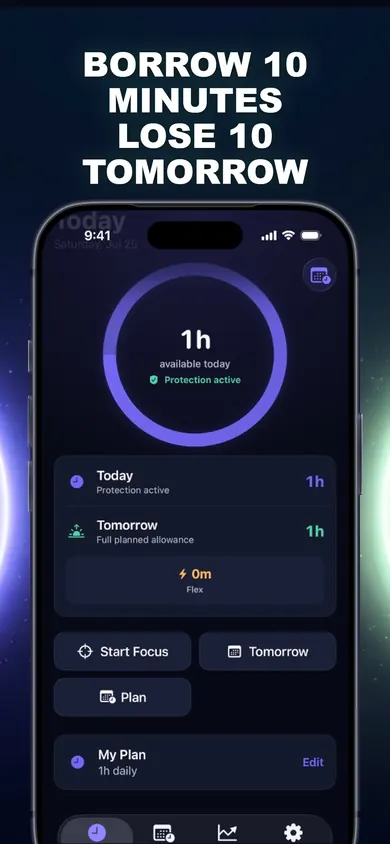
The match has one round left. The allowance ran out four minutes ago and the shield is up. Last month this was a twenty-minute argument.
Tonight the rule is already agreed: games before 9 p.m. can borrow up to 15 minutes, and it comes out of tomorrow. Your teen opens Time Debt and picks 15 minutes; because family settings are protected, you confirm with Face ID on the same phone. The screen shows the price before anything happens: today plus 15, tomorrow's normal hour, and tomorrow's adjusted 45 minutes, side by side.
Friday at 4 p.m. the allowance reads 45 minutes. Nobody had to remind anyone. If the round finishes early and the borrowed session is ended, the unused minutes go back.
Honest limits
- Time Debt is a voluntary commitment tool for digital wellbeing, not a parental-control system and not medical or psychological treatment.
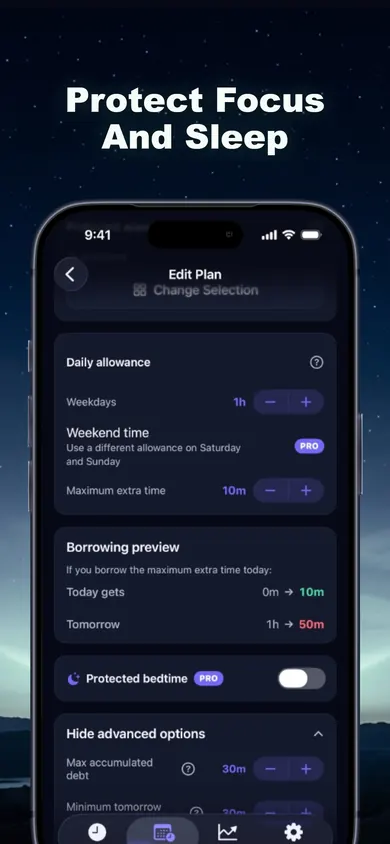
- Protected bedtime hours and different weekend allowances show a Pro label in the app's plan screens; the free core plan covers one plan with blocking, borrowing and repayment.
- Repayment never pushes tomorrow below the minimum you set, so borrowing cannot wipe out a whole day.
- It does not change limits set in iOS Settings or by a Family Sharing organiser.
Parents' questions about extra screen time
Should I give my teenager more screen time when they ask?
Sometimes. A planned yes is still a limit: decide in advance which reasons count (finishing a match, a project) and what it costs. Requests in the hour before bed are the easiest to turn down, because that hour is for winding down.
How much screen time should a teenager have?
There is no single number that fits every family. Mayo Clinic suggests clear household rules, tech-free times such as meals, no screens in the hour before bedtime, and revisiting the rules as your child grows.
How do I stop the nightly argument about more time?
Move the decision out of the moment. Agree the rules once, write them down, and give extra time a visible price. With Time Debt, extra minutes are borrowed from tomorrow's allowance and repaid automatically, once, with no interest.
Can my teen request more time in Time Debt from their own phone and I approve from mine?
No. Time Debt's family tools work on one shared or handed-over iPhone: requests and parent approvals happen on the same device, and parent-only settings are protected by Face ID, Touch ID or passcode. There is no remote monitoring. For approvals from your own phone, Apple's Family Sharing is the tool.
What if my teen needs the phone for homework?
Only the apps and sites you select are limited. Keep school apps outside the plan so homework never competes with games for the same minutes.
Is Time Debt free?
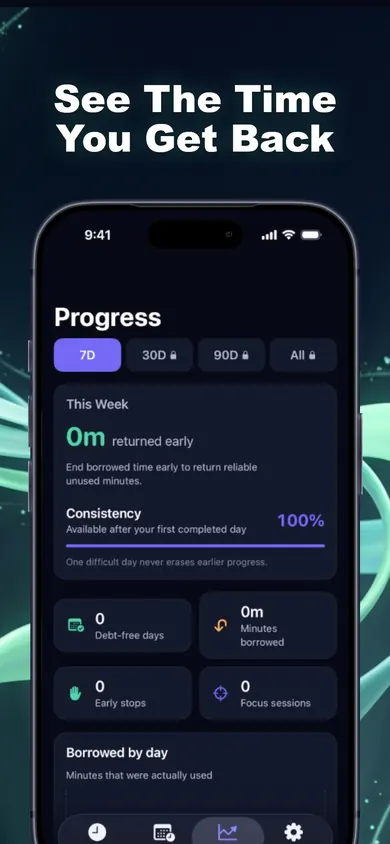
The core plan is free: one full plan with real blocking, borrowing, automatic repayment, 7-day history and emergency access. Time Debt Pro adds multiple plans, custom schedules, multi-day repayment, longer history, guided programs and expanded family tools.
Can my teen just remove the blocks?
Time Debt's emergency access removes every shield until tomorrow, at any time, at no cost, and on a phone you hand over, Screen Time permission can be withdrawn in Settings. It is a commitment tool, not a lock. If you need enforcement, use Family Sharing's Screen Time controls from your own device.
Try it tonight
Set one plan on your teen's iPhone together, agree the borrowing cap, and let tomorrow keep the score.

Time Debt on the App Store · core plan free · Updated November 2026
Related
- Time Debt: borrow screen time from tomorrow, on purposeTime Debt blocks apps at your daily limit. Want more? Borrow 5, 10 or 15 minutes and tomorrow starts that much shorter. Free core plan on iPhone.
- Limit a child's screen time without Family SharingA visual step guide for a shared or handed-over iPhone: lock Screen Time on the device, then add a borrow-and-repay allowance with parent approval.
- App Limits vs Downtime: which to use, and your first weekApp Limits cap how long, Downtime caps when. Play a 20-second day with each, then follow a 7-day first week. iOS 26 and iOS 27 checked.
- What happens when you ignore a Screen Time limitIgnore Limit, One More Minute, Remind Me in 15: what each one does on iPhone, who sees it, and a free 3-tap check of what your habit costs.