The Saturday the old phone changed hands
The new phone arrived on Friday. By Saturday the old one, still signed into the parent's Apple Account, belonged to a nine-year-old. Nobody wanted to set up a child account that morning. By lunch it had been three hours of one game, and the house rule ("an hour, then off") had been argued down twice.
That is the gap this guide is for: a phone that is now the child's, a parent who is still the account owner, and no Family Sharing in between. The story is our own example, not a customer quote.
How do you limit kids' screen time without Family Sharing?
Set the limits on the phone itself: turn on Screen Time, lock it with a passcode only you know, then add an app that gives a daily allowance with parent approval on the same device. {APPLE_FS} notes that where the law requires it, a child under 18 with their own Apple Account must be in a Family Sharing group, so if your child has their own account, use Family Sharing. This guide is for the shared family phone or the hand-me-down still on a parent's account.
Without Family Sharing the rules live on the phone, so the phone is where you lock them.
How it works in three steps
- Lock Screen Time on the device. {APPLE_PC} lists Settings → Screen Time → Passcode & Management → Lock Screen Time Settings in iOS 27. Add passcode recovery with your Apple Account.
- Set up a Time Debt family plan. Pick the apps, the allowance and the borrowing cap. Lock parent-only settings with Face ID, Touch ID or the passcode.
- Hand it over. When time runs out, a calm shield covers the selected apps. Your child can stop for today or ask to borrow, and you approve on the same phone.
Annotated screenshot tour
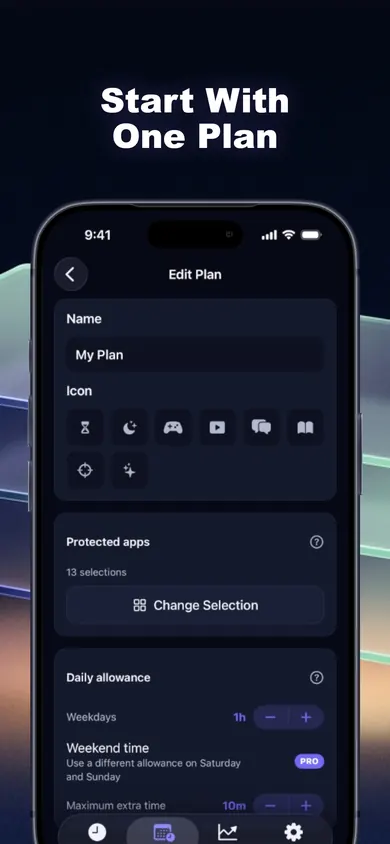
Step 1
Name the plan and pick the apps
The plan screen holds everything: a name, an icon, the protected apps (here 13 selections) and the daily allowance. One plan is free; multiple plans are Pro.
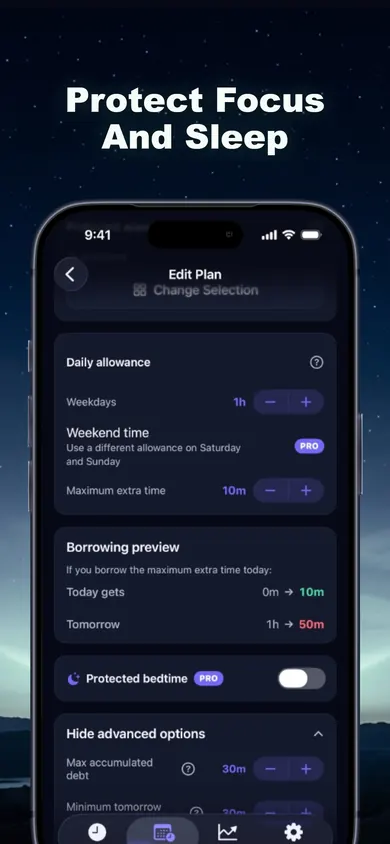
Step 2
Read the borrowing preview
Before anything is saved, the preview shows the worst case: if all 10 extra minutes are borrowed today, tomorrow gets 50 minutes instead of 60. Protected bedtime carries a Pro label in this screenshot.
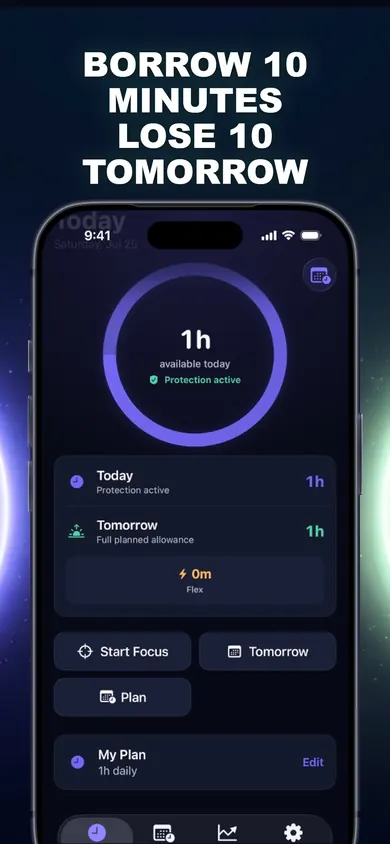
Step 3
Hand over the phone
The home ring is what your child sees: time left today, tomorrow's allowance, Start Focus and the plan. When borrowing happens, tomorrow's number visibly drops.
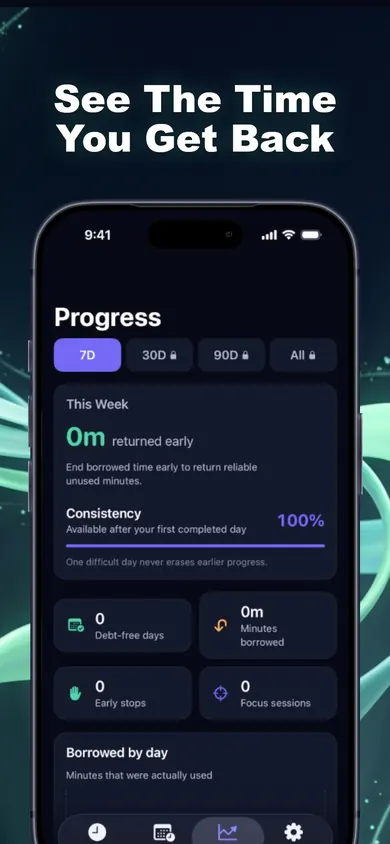
Step 4
Check the week together
Progress shows borrowed minutes, early stops and focus sessions, labelled plainly and never framed as failure. The free history covers 7 days.
Family Sharing vs a shared-phone plan: comparison strip
Apple Family Sharing
- Manage from your own iPhone
- Settings sync across the family's devices
- Ask to Buy and contact approvals
- Needs a child account in your family group
Time Debt on one phone
- Everything happens on the shared device
- Borrow today, repay tomorrow, once
- Parent settings behind Face ID or passcode
- No remote monitoring at all
They are not rivals. Many families will use both: Family Sharing for the account rules and Time Debt for a daily allowance a child can understand. If you want location, remote approval or content filtering, Family Sharing or a dedicated parental-control service is the better pick.
What the setup ring is for
The ring at the top of the page is a checklist you can keep open while you hold the child's phone in the other hand. Each tick is one screen in Time Debt or Settings, in the order that avoids going back. When the ring closes you have a plan, a cap, a bedtime and a lock. It saves nothing and sends nothing; it simply keeps your place.
Why borrowing, not a hard stop? Because "five more minutes" is going to be asked for anyway. We would rather the asking cost something visible. When tomorrow's ring is ten minutes smaller, the trade is on the screen, not in an argument. For sleep, the CDC sleep guidance (checked November 2026) recommends 9 to 12 hours a night for children aged 6 to 12, which is a good reason to keep borrowing switched off during protected bedtime hours.
Honest limits
- Time Debt works on one device. It will not limit a tablet, console or second phone.
- Emergency access can lift Time Debt's shields until tomorrow. It does not change limits set in iOS Settings.
- Pro adds multiple plans, custom schedules and expanded family tools; the core plan is one plan.
- It is a voluntary commitment tool, not a parental surveillance app, and not treatment for anything.
Shared-phone screen time questions
Can I limit screen time on my child's iPhone without Family Sharing?
Yes, on the device itself. Screen Time on that iPhone can be set up and locked with a Screen Time passcode, and an app like Time Debt can add a daily allowance with parent approvals on the same device. What you lose without Family Sharing is managing it from your own phone.
Is Family Sharing required for a child's Apple Account?
Apple says that where legally required, an Apple Account for a child under 18 must be part of a Family Sharing group. A handed-down phone signed into a parent's account, or a shared family iPad, is a different situation.
Does Time Debt let me monitor my child remotely?
No. Time Debt's family plan runs on one shared or handed-over iPhone. Requests and approvals happen on that device, parent-only settings sit behind Face ID, Touch ID or passcode, and there is no remote monitoring.
What happens when my child borrows extra time?
They pick 5, 10 or 15 minutes or a custom amount within the cap you set, and tomorrow's allowance is shorter by that much. It is repaid once, with no interest, and tomorrow never drops below the minimum you choose.
Is Time Debt free for families?
The core plan is free: one full plan with real blocking, borrowing, automatic repayment, 7-day history and emergency access. Time Debt Pro is a subscription that adds multiple plans, custom schedules, multi-day repayment, longer history, guided programs and expanded family tools.
Can my child just turn it off?
On a device you hand over, protect the Screen Time permission and Time Debt's parent settings with a passcode or Face ID your child does not know. Emergency access can remove Time Debt's shields until tomorrow, and it does not change limits set in iOS Settings.
Play free on iPhone
Set one plan on the shared phone tonight. Time Debt on the App Store has a free core plan.

Updated November 2026
Related
- Time Debt: borrow screen time from tomorrow, on purposeTime Debt blocks apps at your daily limit. Want more? Borrow 5, 10 or 15 minutes and tomorrow starts that much shorter. Free core plan on iPhone.
- App Limits vs Downtime: which to use, and your first weekApp Limits cap how long, Downtime caps when. Play a 20-second day with each, then follow a 7-day first week. iOS 26 and iOS 27 checked.
- What happens when you ignore a Screen Time limitIgnore Limit, One More Minute, Remind Me in 15: what each one does on iPhone, who sees it, and a free 3-tap check of what your habit costs.
- Opal vs Screen Time (and a third option)Opal vs Apple Screen Time, compared at the moment your limit runs out, plus a third way that makes extra time cost tomorrow. Checked Nov 2026.