How do you limit gaming time on iPhone?
Set a daily time limit on the whole Games category in Screen Time, make it block instead of letting you ignore it, and decide in advance what happens when the limit hits in the middle of a match. Most game limits fail at that last moment, so the fix is a small, capped way to finish that costs tomorrow a few minutes.
| Mistake | Why it backfires | Fix |
|---|---|---|
| 01Limiting one game | You switch to the next game in the folder. | Limit the Games category, or pick every game you play. |
| 02One number for every day | Saturday blows through it by lunch, so the whole limit feels fake. | Use Customize Days, or a separate weekend allowance. |
| 03A limit you can ignore | Ignoring once makes ignoring twice easier. | Block at the end, or give extra time a real cost. |
| 04Limit lands mid-match | Quitting means losing, so you override. | Allow a small, capped top-up that comes off tomorrow. |
| 05Starting at zero | Going from three hours to thirty minutes lasts about a day. | Start just under your real daily average and trim later. |
A game limit is only as strong as what happens at minute 61.
Honest limits of a game time app
- It cannot pause a match. Time Debt shields apps when your allowance runs out. A ranked match does not care; borrowing before you queue is the honest workaround.
- It is voluntary. On your own iPhone, Screen Time permission can be withdrawn in Settings. Time Debt is a commitment tool, not a lock you cannot open.
- Emergency access always exists. You can remove every Time Debt shield until tomorrow, at no cost. We built that on purpose; a tool that traps you is a tool you delete.
- It does not touch iOS limits. Emergency access does not change Screen Time limits set in iOS Settings or by a Family Sharing organizer.
Who should use something else
Parents of a child with their own iPhone. Time Debt has no remote monitoring. Family Sharing's Screen Time is built for that job.
People who want the games gone, full stop. Deleting them is simpler and free.
Anyone whose gaming involves spending money they can't afford, or feels out of control. A timer is not enough there. Talk to someone you trust or a professional.
How to set a game limit that holds, in 3 steps
- Read your real number. In Settings, Screen Time, look at your daily average for games over a week. Your limit starts just under that, not at a wish.
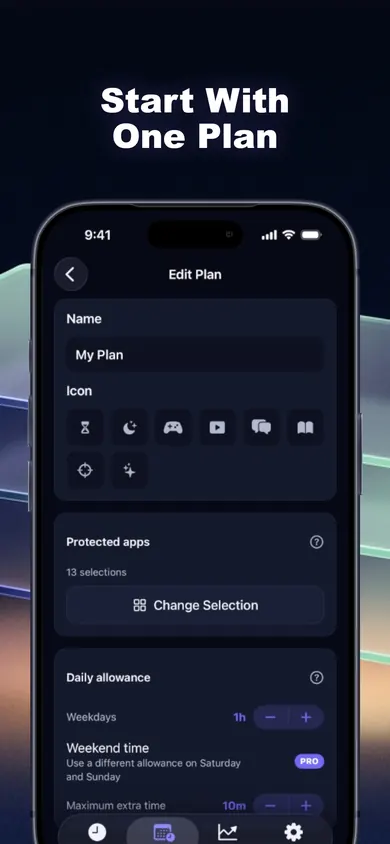
- Shield the category. In Time Debt, pick your games with Apple's private picker and set a daily allowance. When it runs out, a calm shield covers them.
- Set the borrowing cap. Choose a maximum extra time, such as 10 minutes, and a minimum tomorrow never drops below. Now minute 61 has a rule.
Gaming limit questions
Can I set a time limit on all games at once on iPhone?
Yes. On iOS 26 you can set a time limit for a category of apps such as Games under Screen Time, App Limits, according to Apple's iPhone User Guide for iOS 26 (2026). On iOS 27 the same idea is called Time Allowances, with categories including Games, per Apple's iOS 27 guide (2026).
Why can I still play after my limit runs out?
By default, Screen Time limits can be ignored once reached, as Apple's iPhone User Guide for iOS 26 (2026) notes. Blocking needs a Screen Time passcode, or an app that adds its own shield.
Can I give myself different limits on weekends?
On iOS 26 App Limits, tap Customize Days to set different amounts per day. In Time Debt, a separate weekend allowance is a Pro option; the core plan has one daily allowance.
What happens in Time Debt when my game time runs out mid-match?
A shield covers the selected apps. You can stop for today, or open Time Debt and borrow 5, 10 or 15 minutes, or a custom amount within your cap. Tomorrow's allowance shrinks by what you used, once, and ending early returns the unused minutes.
Does Time Debt see which games I play?
No. Apple provides anonymous tokens, so Time Debt never sees app names or content. Your rules and history stay on your iPhone and work offline.
Can I use this to limit my child's gaming?
Time Debt has family tools for a shared or handed-over iPhone, with parent-only settings behind Face ID, Touch ID or passcode. There is no remote monitoring, so for a child's own phone, Family Sharing's Screen Time is the better fit.
Is Time Debt free?
The core plan is free: one full plan with real blocking, borrowing, automatic repayment, 7-day history and emergency access. Pro adds multiple plans, custom schedules, multi-day repayment, longer history and guided programs.
iPhone game limits compared
| App Limits (iOS 26) | Time Allowances (iOS 27) | Time Debt | |
|---|---|---|---|
| Limit the Games category | Yes | Yes | Yes, via Apple's picker |
| Different days | Customize Days | Schedules for weekdays and weekends | Weekend allowance (Pro) |
| At the limit | Can be ignored by default | Not stated in Apple's guide | Shield, then stop or borrow |
| Extra time costs | Nothing | Nothing stated | Tomorrow's minutes, once |
Sources: Apple's iPhone User Guide for iOS 26 (2026) and Apple's iOS 27 guide (2026). Apple's tools are free and built in; set them first, and add Time Debt if the ignore button keeps winning.
Sunday, 8:52 p.m.
Picture it. One hour of games a day, and Sunday's hour ran out four minutes into a match with friends. Old way: ignore the limit, play two more matches, feel faintly stupid at 10:30.
New way: the shield comes up, you open Time Debt, borrow 10 minutes. The preview shows Monday dropping from 1h to 50m. You confirm, finish the match, and stop. It took 7 minutes, so Monday loses 7. Monday's lunch break has 53 minutes of games, which is plenty.
You don't need more willpower. You need minute 61 to cost something.
Start on your iPhone tonight
One plan, one allowance, one cap on extra time. The core plan is free.

Start Time Debt on your iPhone
Updated November 2026
Related
- Time Debt: borrow screen time from tomorrow, on purposeTime Debt blocks apps at your daily limit. Want more? Borrow 5, 10 or 15 minutes and tomorrow starts that much shorter. Free core plan on iPhone.
- App Limits vs Downtime: which to use, and your first weekApp Limits cap how long, Downtime caps when. Play a 20-second day with each, then follow a 7-day first week. iOS 26 and iOS 27 checked.
- What happens when you ignore a Screen Time limitIgnore Limit, One More Minute, Remind Me in 15: what each one does on iPhone, who sees it, and a free 3-tap check of what your habit costs.
- Limit a child's screen time without Family SharingA visual step guide for a shared or handed-over iPhone: lock Screen Time on the device, then add a borrow-and-repay allowance with parent approval.