How do you stop impulse buying on Black Friday?
Stop the purchase before the app opens, not at checkout: block shopping apps and sites for the sales week, and let yourself in only with a short, timed Pass you chose on purpose. By the time you are looking at a countdown and a crossed-out price, the deal is doing the deciding.
The numbers say the phone is where it happens. Adobe Analytics (December 2, 2025) counted 52.8% of US online holiday spending on mobile between November 1 and December 1, 2025. And the urgency is mostly theatre: Which? (November 25, 2025) found 83% of 175 tracked products were the same price or cheaper at least once outside the sales period.
The deal will come back. The ten minutes you spend deciding is the part that matters.
Proof: what the shield looks like in sales week
FocusPass uses Apple's Screen Time picker, so you can protect a whole category such as Shopping, single apps, or shopping websites in Safari.
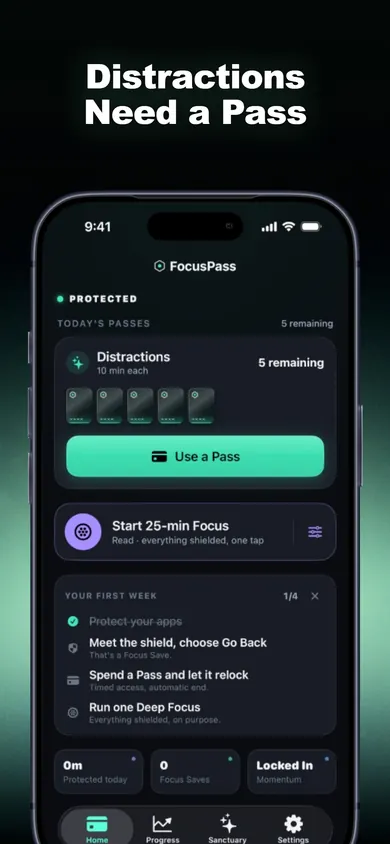 5 Passes left
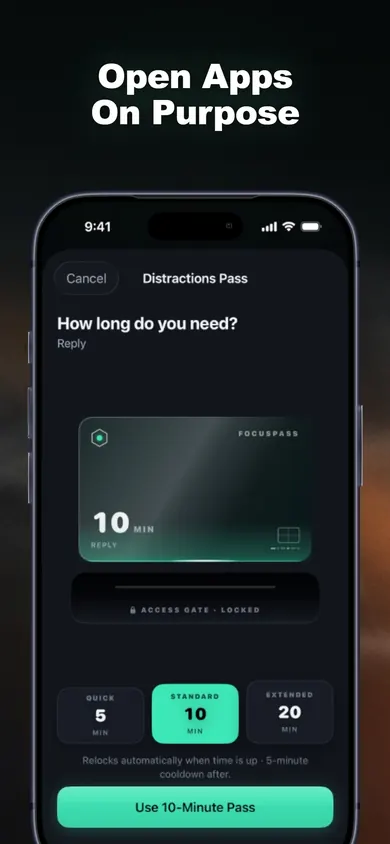 pick a length
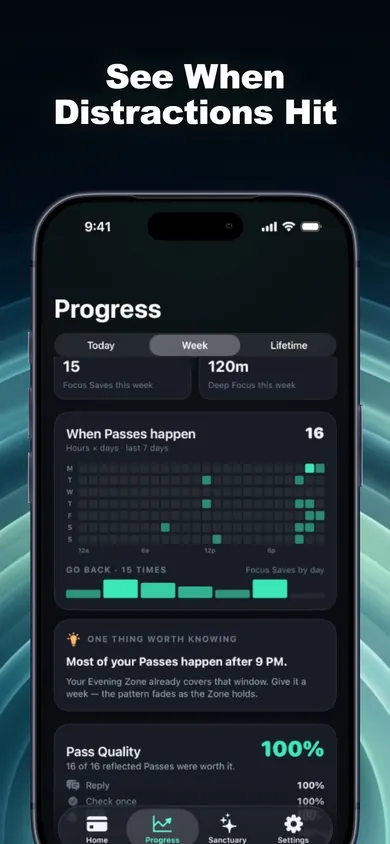 when you reach
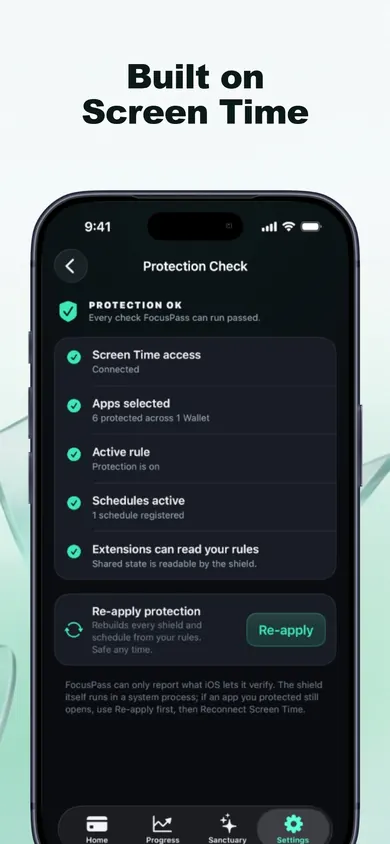 check it works
Black Friday impulse buying: quick answers
How do I stop impulse buying on my phone during Black Friday?
Add friction at the moment you open a shopping app. Put the apps and shopping sites behind a block before the sales start, then let yourself in only on purpose with a short timed Pass. Moving your saved card details off your phone helps too.
When is Black Friday 2026?
Black Friday 2026 is Friday, November 27, the day after US Thanksgiving (Thursday, November 26). Cyber Monday is November 30.
Are Black Friday deals really cheaper?
Often not. A Which? study published November 25, 2025 found 83% of 175 tracked products were the same price or cheaper at least once outside the Black Friday period, and none were cheapest only on Black Friday itself. That study covered UK retailers.
Can I block Amazon and other shopping apps on iPhone?
Yes. Apple's Screen Time picker lets an app blocker shield apps, whole categories such as Shopping, and websites. In FocusPass, opening a protected app shows a shield with Go Back or Use a Pass.
What if I genuinely need to order something?
Use a Pass. Pick a length such as 10 minutes and the reason Check something, buy the thing, and the app relocks on its own when time is up, even if FocusPass is closed.
Is FocusPass free?
Yes for the core: shields, Go Back and Focus Saves, timed Passes, automatic relocking, one Wallet, one Focus Zone, one Deep Focus session a day and 7-day insights. FocusPass Pro (monthly or yearly) adds more Wallets and Zones, Task Access, full history and more.
Will FocusPass stop me spending money?
No app can do that for you. FocusPass adds a pause and a choice before a shopping app opens and counts each Go Back as a Focus Save. It is not a budgeting app and does not see your purchases.
Ways to block shopping apps for Black Friday, compared
| Method | What happens at 11 PM on Thanksgiving | Weak spot |
|---|---|---|
| Delete the apps | Nothing to open, until you reinstall or use Safari. | The website still works, with your card saved. |
| iPhone App Limits | A limit screen after your daily minutes. | One tap on Ignore Limit and you are back in. |
| Remove saved cards | You have to find your wallet. | Apple Pay and one-click checkout still exist. |
| FocusPass shield | Go Back, or Use a Pass with a length and a reason. | Turn Off All Protection always works. That is on purpose. |
We make FocusPass, so read that last row with that in mind. The honest version: stacking two of these works better than any one. A shield on the apps plus no saved card is a lot of friction for a pair of headphones you did not want on Wednesday.
Friction you set up on a calm Tuesday beats willpower at midnight on Friday.
A mini story: Thanksgiving night, 10:52 PM
The dishes are done, the house is quiet, and a push notification says a robot vacuum is 40% off for the next 1 hour 07 minutes. Thumb on the shopping app. The FocusPass shield appears: PROTECTED. You chose to protect this app.
Two buttons. Go Back, or Use a Pass. Choosing Use a Pass means picking a length and a reason, and "Check something" is the honest one tonight. Ten minutes, Pass starts. The vacuum is in the cart. The cart has a total.
Ten minutes is long enough to read the reviews and short enough that "maybe also the matching dock" does not happen. The Pass ends, the app relocks on its own. The vacuum is still in the cart in the morning, and so is the decision. That is the whole trick.
A scenario we wrote, not a customer story.
Your Black Friday week setup, from the sorter
Sort the six cards at the top to see your score here.
- Monday, Nov 23: protect the Shopping category and any store sites you use in Safari. Run Protection Check.
- Set one Wallet for those apps, for example 2 Passes a day. Every Pass costs one; when they are gone, Go Back is the only door.
- Add a Focus Zone for your weak hours. If the heatmap later says "most of your Passes happen after 9 PM", that is your Evening Zone.
- Thursday to Monday: each time you tap Go Back, FocusPass records a Focus Save. No invented dollars saved, just the choice, counted.
One design decision: FocusPass never counts money or minutes it cannot see. A Focus Save is one honest tap on Go Back, nothing more. One limit: if a parent or organization manages your Screen Time, their settings come first, and blocking always happens on your iPhone, not the Watch. Pick something else if you want a budget tracker or a price-history tool; FocusPass does neither.
Make it a habit with FocusPass
Set it up before November 27, keep it for every sale after. Get FocusPass on the App Store: shields, Passes and automatic relocking are free.

Updated November 2026
Related
- FocusPass: the free iPhone app blocker with timed PassesFocusPass blocks the apps you pick with Apple's Screen Time shield. Need one? Take a 5, 10 or 15-minute Pass and it relocks itself. Free core.
- App blockers that allow temporary access, comparedFocusPass, one sec, Opal, Jomo and ScreenZen compared on one thing: how each lets you back into a blocked app for a few minutes. Checked Nov 2026.
- How to block apps on your own iPhone: a checklistA 5-minute checklist to block apps on your own iPhone: Screen Time settings first, then when an app blocker helps. Take the 3-tap quiz for your list.
- Printable digital detox worksheet for beginnersA free 2-page digital detox worksheet for beginners: a one-evening app audit, three starter rules and a 7-day tally. Print it, no sign-up.