Which app blocker allows temporary access?
FocusPass, Opal, Jomo, one sec and ScreenZen all let you back into a blocked iPhone app for a while, but they differ in how you ask, how long you get and whether the app locks itself again. We make FocusPass, so read this with that in mind. Everything below about the other four comes from their own App Store listings, which we read on 3 November 2026.
Apple's built-in limits are the starting point most people outgrow. On a limit you set for yourself, the screen still offers a way to dismiss it, and once dismissed there is no timer bringing the block back. A temporary pass fixes exactly that gap.
Who a temporary-access blocker is not for
If you want an app gone for good, a pass is the wrong tool. Delete the app, or use a blocker mode with no way out: Opal's listing says its Deep Focus "won't let you cancel or bypass at all". If you are a parent managing a child's phone, Apple's Family Sharing controls are built for that and none of these five is a remote parental control. And if you are on Android, FocusPass and Opal's current listing are iPhone only.
A pass is for apps you need sometimes. For apps you never need, a pass is just a door you will keep opening.
App blockers with temporary access, compared
| App | How you get back in | Does it relock? | Free part | Paid (US, as listed) | Needs |
|---|---|---|---|---|---|
| FocusPass (ours) | Shield offers Go Back or Use a Pass. Pick a length, e.g. 5, 10 or 15 min, and an optional reason. | Yes. Relock is scheduled with iOS before the app opens, even if FocusPass is closed. | Shields, timed Passes, relock, 1 Wallet, 1 Focus Zone, 1 Deep Focus a day | Pro, monthly or yearly | iOS 18+ |
| one sec | A short pause with a breathing animation, then you can continue. | Re-Intervention removes you after a set time, e.g. 5 min, and asks again. | One app, plus a Safari extension | $6.99/mo, $19.99/yr, $99.99 lifetime | iOS 15+ |
| Opal | Breaks: choose the app, write your intention, set a timer. A waiting room can add a delay. | Breaks are timed. | Free download; listing does not map every feature to free or paid | Several plans from $4.99/week to $99.99/yr | iOS 18+ |
| Jomo | Breaks after a short delay; locks can require an exercise or a set number of uses per day. | Breaks are timed. | Free download; listing does not say which features need Plus | $5.99/mo, $29.99/yr, $99.99 lifetime | iOS 16+ |
| ScreenZen | Wait through a delay, which can grow with each open, then continue. | Optional block once you reach a usage goal. | All of it; optional tips | Tips $5 to $40 | iOS 15+ |
Sources: the US App Store listings for one sec (by riedel.wtf apps), Opal: Screen Time Control, Jomo - Screen Time Blocker, ScreenZen- Screen Time Control and FocusPass, read 3 November 2026. Developer sites: one-sec.app, opal.so, jomo.so, screenzen.co. Prices change; check the listing before you buy.
Who should pick what
- Pick one sec if you mostly open apps on autopilot and a breath is enough to change your mind. It delays rather than blocks, and its free tier covers one app.
- Pick ScreenZen if price is the deciding factor. It is free and donation-supported, with delays that get longer the more you open an app.
- Pick Opal if you want, alongside breaks, a mode with no way out at all, plus scores and leaderboards.
- Pick Jomo if you like earning access: its listing describes exercises, habits and a set number of opens per day.
- Pick FocusPass if you need a few apps for real reasons and want each visit to have a length, an optional reason and a relock you do not have to remember.
What the Pass demo above shows
The shield at the top is a toy version of the FocusPass shield. Tap Go Back and the Focus Save counter goes up by one. Tap Use a 10-min Pass and a ten-minute countdown runs at 60 times speed, then the shield comes back by itself. That last part is the point of a temporary-access blocker: you do not have to remember to close the door.
In the real app the counter is just as literal. A Focus Save is one tap on Go Back, nothing more. We chose not to estimate "minutes saved" because we cannot see what you did instead, and a number we made up would feel good and mean nothing.
How FocusPass handles temporary access, in three steps
- Protect. Choose apps, categories or websites with Apple's Screen Time picker. Keep anything essential in Essentials so it always opens.
- Choose a Pass. At the shield, pick a length and, if you like, a reason such as Reply, Post, Check something or Research. A Wallet sets how many Passes a group of apps gets per day.
- Let it relock. The app locks again when the Pass ends. End it early if you are done. Turn on a Reset Window if one Pass tends to become three.
Honest limits of FocusPass
- Free has one Wallet, one Focus Zone and one Deep Focus session a day. More Wallets with custom rules, Task Access and unlimited Deep Focus are Pro.
- Turn Off All Protection always works. That is deliberate, and it also means FocusPass will not stop a determined you.
- If a parent or organization manages Screen Time on the device, their settings come first.
- Apple keeps your app selections opaque, even to us, so FocusPass cannot show app names in some places where you might expect them.
Proof: a guided tour of the Pass flow
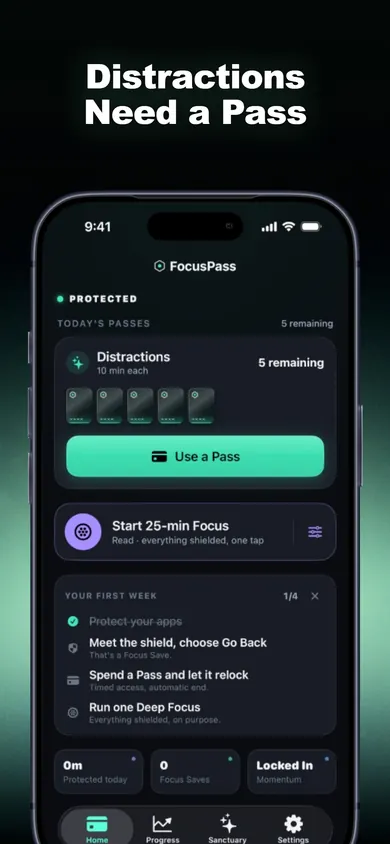
Home: your daily allowance of Passes.
- 1Today's Passes: 5 left in this Wallet
- 2Use a Pass from Home, not only from the shield
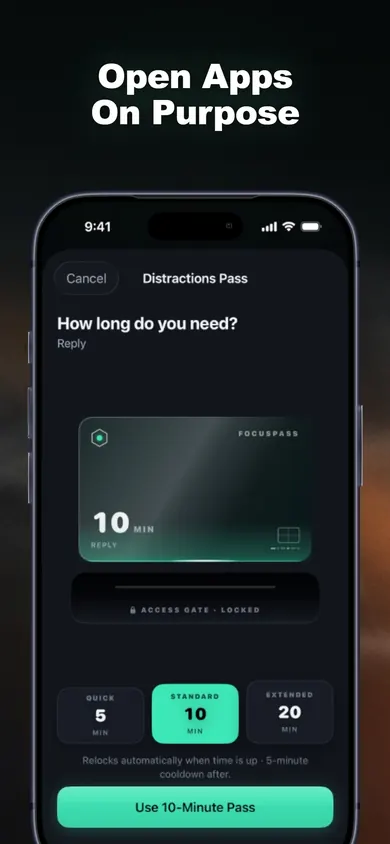
The Pass sheet: decide before you open.
- 1Reason: Reply
- 2Pick 5, 10 or 20 minutes
- 3Relocks automatically when time is up
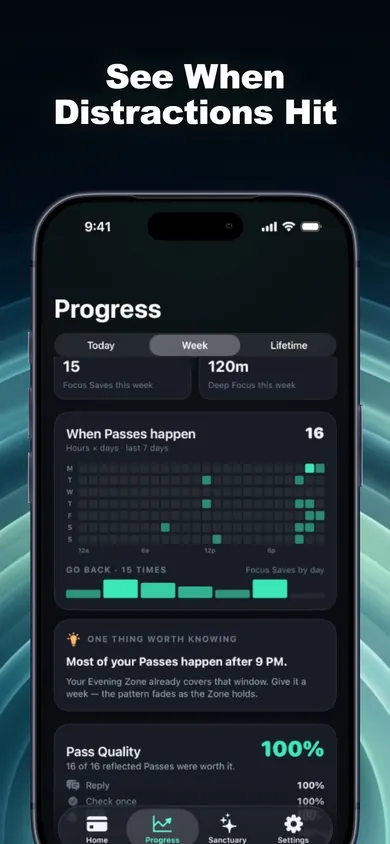
Where your Passes go.
- 1Heatmap of when you reach for apps
- 2One pattern, one optional fix
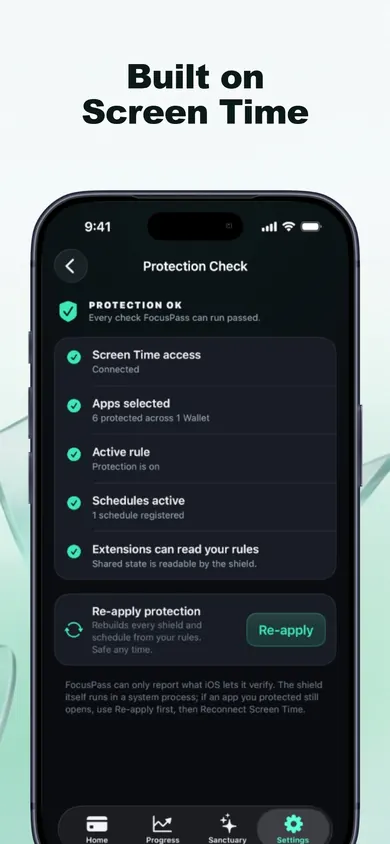
Protection Check: what is working.
- 1Every check shown in plain words
- 2Re-apply if iOS dropped a shield
Temporary access questions
Is there an app blocker that lets you use an app for a few minutes?
Yes. Several iPhone blockers built on Apple's Screen Time frameworks offer a timed way back in: FocusPass calls it a Pass, Opal and Jomo call it a break, and one sec lets you continue after a pause and pulls you out again after a set time with Re-Intervention.
Can I temporarily unblock an app with Apple's own Screen Time?
Partly. When a self-set limit is reached, the screen still offers a way to dismiss it, so there is no fixed length and nothing relocks the app for you later in the day the way a timed pass does.
Which app blocker relocks the app automatically?
FocusPass schedules the relock with iOS before the app opens, so protection returns when the Pass ends even if FocusPass is closed. Opal and Jomo breaks run on a timer. one sec's Re-Intervention removes you from the app after the time you set.
What is the best free app blocker with temporary access?
ScreenZen is free and donation-supported. FocusPass has a free plan that includes timed Passes with automatic relock, one Wallet and one Focus Zone. one sec is free for one app. Opal and Jomo are free to download with paid tiers.
Will a temporary pass turn into an hour of scrolling?
It can with any tool. FocusPass has an optional Reset Window so one Pass cannot immediately become three, and you can end a Pass early. one sec's Re-Intervention and ScreenZen's growing delays aim at the same problem.
Does FocusPass work on Android?
No. FocusPass is for iPhone and iPad with iOS 18 or later. The Apple Watch app shows status and the timer, but blocking happens on the iPhone.
Try it tonight
Protect the one app you open without thinking, give it five Passes, and see how many you actually spend. FocusPass on the App Store is free to start.

Updated November 2026
Related
- FocusPass: the free iPhone app blocker with timed PassesFocusPass blocks the apps you pick with Apple's Screen Time shield. Need one? Take a 5, 10 or 15-minute Pass and it relocks itself. Free core.
- How to block apps on your own iPhone: a checklistA 5-minute checklist to block apps on your own iPhone: Screen Time settings first, then when an app blocker helps. Take the 3-tap quiz for your list.
- How to stop doomscrolling at night: the factsWhat 2025-2026 research says about scrolling in bed, plus a fix for the exact moment you start. Sources dated and linked. Updated Nov 2026.
- Printable digital detox worksheet for beginnersA free 2-page digital detox worksheet for beginners: a one-evening app audit, three starter rules and a 7-day tally. Print it, no sign-up.