What is FocusPass?
FocusPass is a free app blocker for iPhone and iPad that shields the apps you choose and lets you open one only by taking a short, timed Pass, after which it relocks on its own. It is built on Apple's Screen Time frameworks, so the block screen is the native iOS shield, not a reminder you can swipe away.
Most blockers give you two settings: locked, or off. FocusPass adds a third: on purpose. You still reply to the message or post the photo. You just decide first, and the door closes behind you.
How the free app blocker works, in three moves
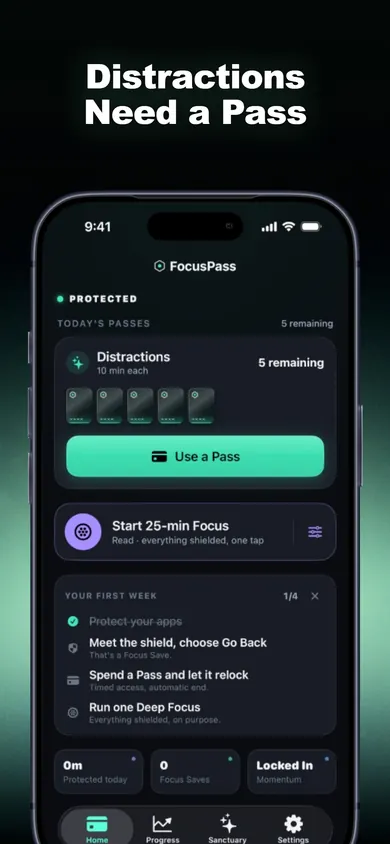
- Protect. Pick apps, categories or websites in Apple's Screen Time picker. Opening one shows the shield: PROTECTED.
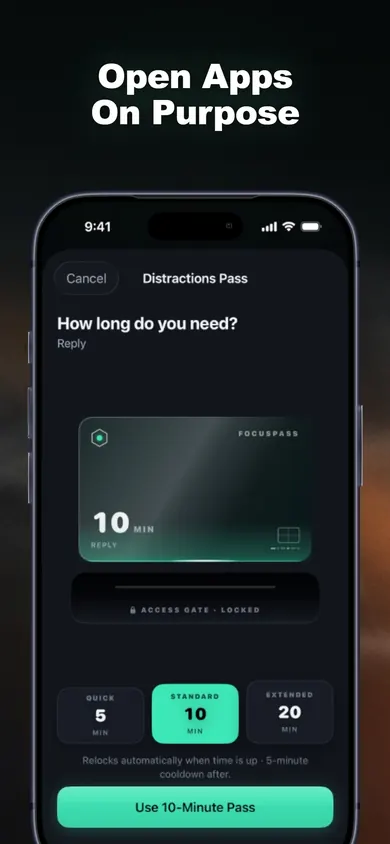
- Choose. The shield gives two buttons. Go Back, or Use a Pass. A Pass has a length (for example 5, 10 or 15 minutes) and an optional reason like Reply, Post, Check something or Research.
- Return. When the Pass ends, the app locks again, even if FocusPass is closed. End a Pass early anytime. An optional Reset Window stops one Pass from turning into three.
The point is not to never open Instagram. It is to never open it by accident.
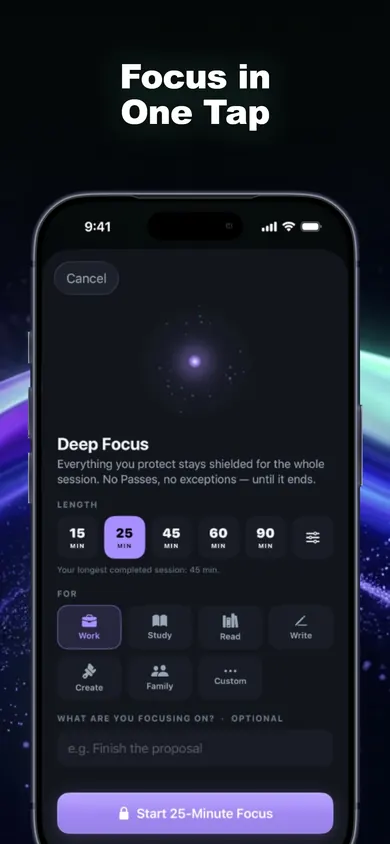
Inside FocusPass
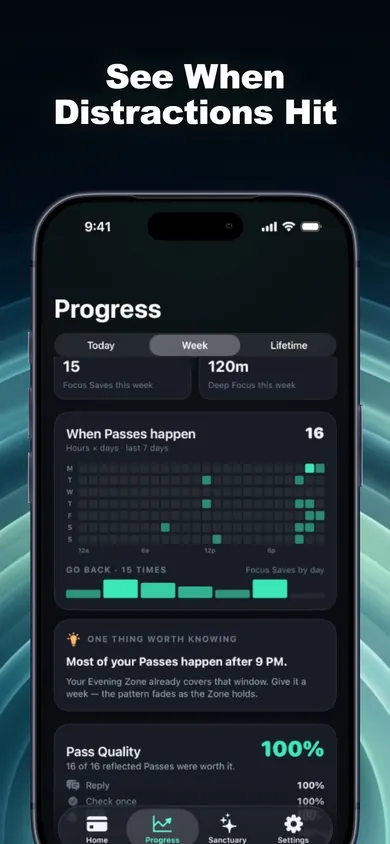
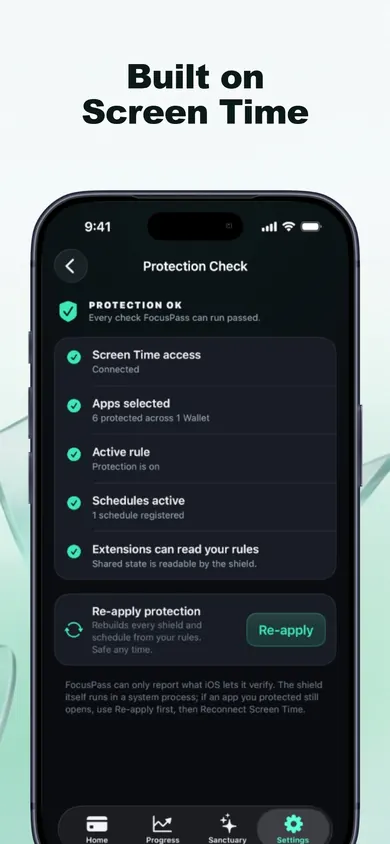
What is free and what is Pro?
Free is meant to be useful forever, not a trial. Pro is a monthly or yearly subscription (the yearly plan has a free trial for eligible new subscribers).
| Feature | Free | Pro |
|---|---|---|
| Native shields, Go Back, Focus Saves | Yes | Yes |
| Timed Passes with automatic relock | Yes | Yes |
| Wallets (daily Pass plans) | 1 | More, with custom rules |
| Focus Zones (Work, Study, Evening, Sleep) | 1 | More |
| Deep Focus sessions | 1 a day | Unlimited |
| Insights history | 7 days | Full history |
| Task Access, Free Windows, Rule Profiles | No | Yes |
Pro never sells a way around your own rules, and Turn Off All Protection is never locked behind a purchase.
Who this app blocker is for, and who it is not
Good fit: you need social or chat apps for work or family, so a total block fails by Wednesday. You want friction, a reason, and a clean exit.
Pick something else if you want a parent to manage a child's phone remotely (FocusPass has no remote controls), you are on Android, or you want a hard lock with no off switch. We chose to keep that switch.
A design decision we made
Every time you tap Go Back, FocusPass records one Focus Save. We count the choice and nothing else: no invented "minutes saved", no guesses about what you did next. The number is smaller than a made-up one. It is also true.
App blocker questions
Is FocusPass a free app blocker?
Yes, the core is free forever: native shields, Go Back and Focus Saves, timed Passes, automatic relocking, one Wallet, one Focus Zone, one Deep Focus session a day, 7-day insights, Momentum and missions. FocusPass Pro (monthly or yearly) adds more Wallets and Zones, Task Access, unlimited Deep Focus and full history.
Does the app relock if I close FocusPass?
Yes. The relock is scheduled with iOS before the app opens, so protection comes back when the Pass ends even if FocusPass itself is closed.
Can FocusPass block websites too?
Yes. You choose apps, whole categories or websites with Apple's own Screen Time picker.
What if I need an app urgently?
Essentials you mark stay available all the time. Turn Off All Protection always works and is never behind a purchase or a streak. In Deep Focus, Focus Rescue gives one short exit per session.
Does FocusPass see which apps I use?
No. Apple keeps your app selections opaque, even to FocusPass. There is no account, no ads and no analytics SDK, and your rules and history stay on your device.
Which devices does it work on?
iPhone and iPad with iOS 18 or later. The Apple Watch app shows your status and focus timer, but blocking always happens on your iPhone.
Will it override Screen Time set by a parent or employer?
No. If a parent or organization manages Screen Time on the device, their settings come first.
Protect one app tonight
Choose the one you open without thinking. Give yourself five Passes. See how many you actually use.

Updated November 2026
More about FocusPass
- App blockers that allow temporary access, comparedFocusPass, one sec, Opal, Jomo and ScreenZen compared on one thing: how each lets you back into a blocked app for a few minutes. Checked Nov 2026.
- How to block apps on your own iPhone: a checklistA 5-minute checklist to block apps on your own iPhone: Screen Time settings first, then when an app blocker helps. Take the 3-tap quiz for your list.
Related
- App blockers that allow temporary access, comparedFocusPass, one sec, Opal, Jomo and ScreenZen compared on one thing: how each lets you back into a blocked app for a few minutes. Checked Nov 2026.
- How to block apps on your own iPhone: a checklistA 5-minute checklist to block apps on your own iPhone: Screen Time settings first, then when an app blocker helps. Take the 3-tap quiz for your list.
- Time Debt: borrow screen time from tomorrow, on purposeTime Debt blocks apps at your daily limit. Want more? Borrow 5, 10 or 15 minutes and tomorrow starts that much shorter. Free core plan on iPhone.
- Limit a child's screen time without Family SharingA visual step guide for a shared or handed-over iPhone: lock Screen Time on the device, then add a borrow-and-repay allowance with parent approval.