What is a digital detox worksheet?
A digital detox worksheet is a one-page plan you fill in by hand: which apps pull you in, at what hours, and the few rules you will try for a week. Writing it on paper matters for beginners because you decide the rules while calm, away from the apps you are deciding about.
Ours is two pages: an audit you can do in one evening, and a seven-day tally that takes under a minute a night. It is free, with no email and no sign-up.
Three small rules you keep beat ten you break by Wednesday.
A mini story: the first week, on paper
Sunday night, a printed sheet and a pen. Section 1 asks for a guess first: "Video app, maybe 40 minutes a day." Then the real number in Settings > Screen Time, which is a lot more than 40. That gap is usually the moment a beginner's detox starts to feel real.
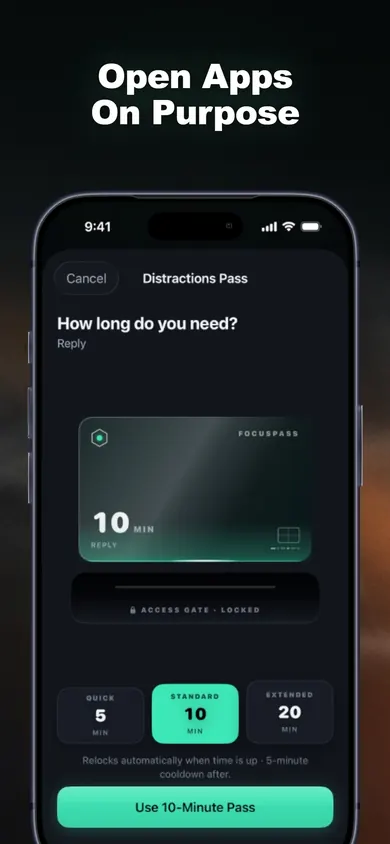
Section 3 turns it into three rules. Protect: the video app. Pass: ten minutes, reason "Check something". Zone: 9 PM to 7 AM. By Thursday the tally shows four stops and two let-ins, and the hardest hour was not the evening at all; it was the commute. Day 7 moves the Zone. That is the whole method.
A composite story we wrote to show how the sheet is used, not a customer account.
What's inside the printable digital detox planner
- Page 1, the audit. Your five automatic apps with a guessed and a real daily time, a checklist of six weak hours, three starter rules (Protect, Pass, Zone) and one line for what you will do instead.
- Page 2, the tally. Seven rows for stops, let-ins, a bent rule and mood, then a Day 7 check-in that tells you to keep, loosen or tighten each rule.
Who this beginner digital detox plan is not for
- Parents setting limits for a child. The sheet is written for your own phone. For a child's device, Apple's Family Sharing tools are the place to start, and if a parent manages Screen Time, those settings come first in FocusPass too.
- Anyone who wants a full phone-free retreat. This is a week of small rules, not a 30-day cold-turkey challenge.
- People who feel they cannot stop at all, or whose phone use is tied to anxiety or low mood. A worksheet is not treatment; talk to a clinician.
How it works in 3 steps
- 1
Print and audit
One evening, page 1. Guess first, then check the real numbers.
- 2
Set the three rules on your phone
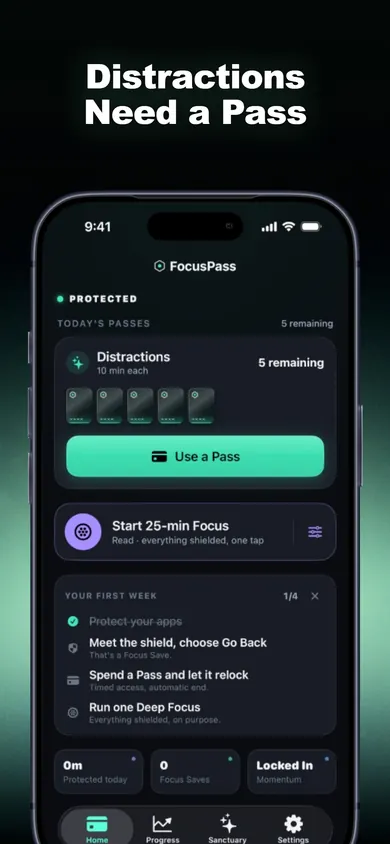
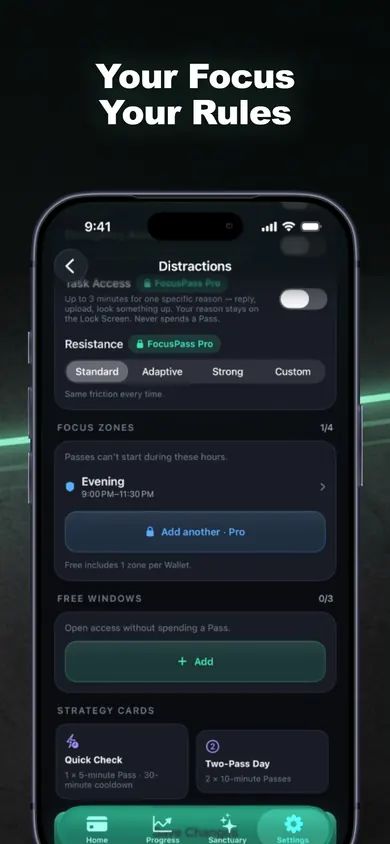
In FocusPass: shield the apps you chose with Apple's Screen Time picker, keep Pass lengths short, and set one Focus Zone. All three are in the free version.
- 3
Tally for seven days
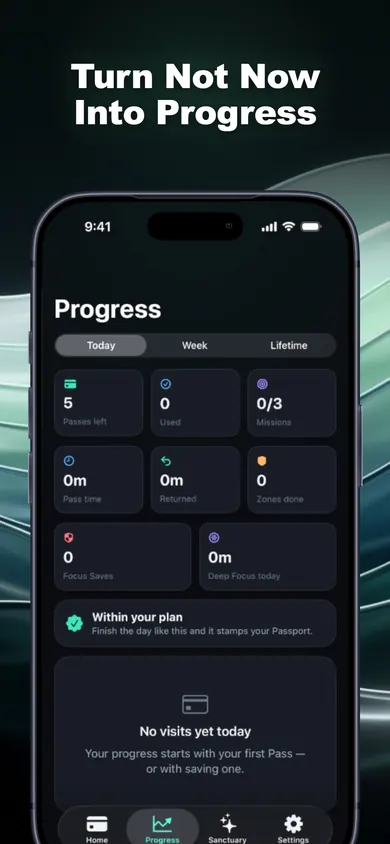
Paper or phone. FocusPass records each Go Back as a Focus Save, so the "times I stopped myself" column fills in on its own if you prefer.
Honest limits
One design decision: the worksheet counts choices, not minutes. FocusPass does the same; it never invents minutes saved. One limit: the free version has one Wallet and one Focus Zone, which fits week one; more Zones, Task Access and full history need Pro. Turn Off All Protection always works, so the app cannot force you; that is deliberate. Pick something else if you want an app that locks you out with no way back, or an Android blocker. FocusPass runs on iPhone and iPad with iOS 18 or later.
Proof: the three rules inside FocusPass
Digital detox worksheet questions
Is this digital detox worksheet free?
Yes. It is a direct two-page PDF download, US Letter, with no email or sign-up. Print it, copy it, share it.
What is on the digital detox worksheet?
Page 1 is a one-evening app audit: your five automatic apps with a guessed and a real daily time, your weak hours, three starter rules (Protect, Pass, Zone) and what you will do instead. Page 2 is a seven-day tally with a Day 7 check-in.
How long should a first digital detox last?
For a beginner, one week with three small rules is a good first run. It is long enough to see which hours are hardest and short enough to adjust without giving up.
Do I have to delete my apps for a digital detox?
No. The worksheet asks you to protect one to three apps, not delete them. Most people still need messages, maps and banking; the goal is opening the other apps on purpose.
How does FocusPass match the worksheet?
The three rules map to three features: shields for the apps you Protect, timed Passes for when you need one, and a Focus Zone for your protected hours. Each Go Back at a shield is recorded as a Focus Save, a digital version of the tally column.
Is FocusPass free?
The core is free: shields, Go Back and Focus Saves, timed Passes, automatic relocking, one Wallet, one Focus Zone, one Deep Focus session a day and 7-day insights. FocusPass Pro (monthly or yearly) adds more Wallets and Zones, Task Access, unlimited Deep Focus and full history.
Start on your iPhone
Print the sheet tonight, set the three rules tomorrow. Get FocusPass free on the App Store.

Updated November 2026
Related
- FocusPass: the free iPhone app blocker with timed PassesFocusPass blocks the apps you pick with Apple's Screen Time shield. Need one? Take a 5, 10 or 15-minute Pass and it relocks itself. Free core.
- App blockers that allow temporary access, comparedFocusPass, one sec, Opal, Jomo and ScreenZen compared on one thing: how each lets you back into a blocked app for a few minutes. Checked Nov 2026.
- How to block apps on your own iPhone: a checklistA 5-minute checklist to block apps on your own iPhone: Screen Time settings first, then when an app blocker helps. Take the 3-tap quiz for your list.
- How to post on Instagram without scrollingFor small businesses and creators who must post: draft outside the app, schedule, then open Instagram on a timed Pass that relocks. Free plan inside.