How do you post on Instagram without scrolling?
You post on Instagram without scrolling by doing everything except the upload somewhere else, then opening the app for one named job with a timer that closes it for you. Write captions in Notes, edit in your camera roll or an editor, pick the hashtags in advance. When you open Instagram, you are only there to press Share.
The feed is not the problem. Arriving without a job is.
Proof: the Pass flow, step by step
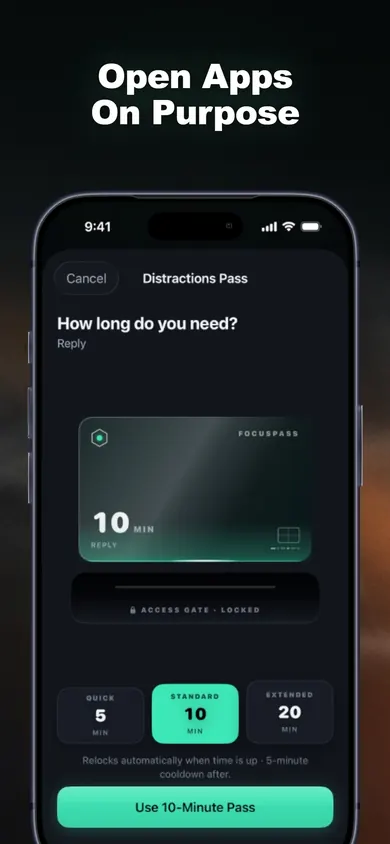
These are FocusPass's own App Store screens. The marker notes are ours.
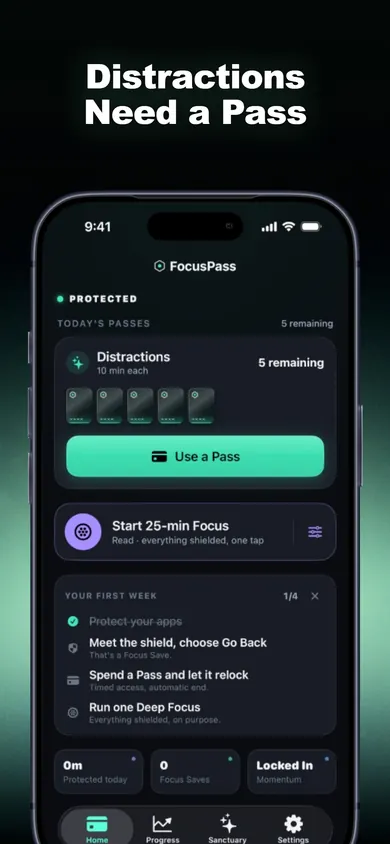
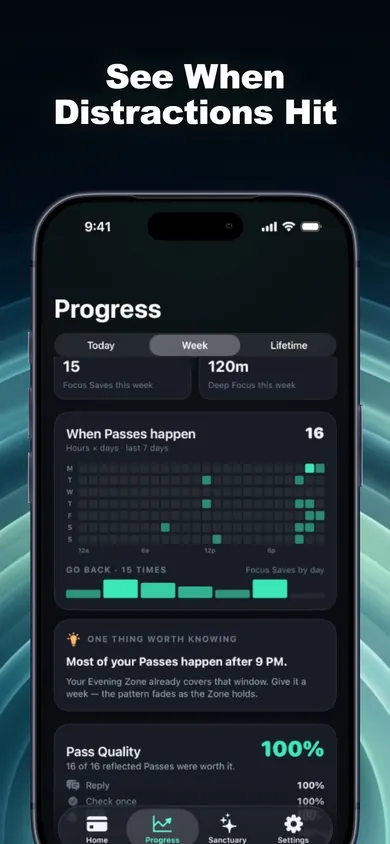
What should you do outside Instagram first?
Almost everything. A post has five parts, and only one needs the app:
| Part of the post | Where to do it | Needs Instagram? |
|---|---|---|
| Photo or video edit | Photos app or your editor | No |
| Caption and hashtags | Notes, saved as a draft | No |
| Product tags, location | Decide in advance, list in your note | Only to apply |
| Scheduling | Instagram's scheduler for professional accounts | Yes, once a week |
| Press Share | Yes, 2 minutes |
On scheduling: TechCrunch reported in November 2022 that business and creator accounts can schedule posts, Reels and carousels in the app up to 75 days ahead. Batch a week's posts in one session and the daily visit shrinks to replies. Steps change, so check the Instagram Help Center before you plan around it.
How long should a work session on Instagram be?
Shorter than it feels like it needs to be. In FocusPass a Pass length is your choice (the sheet offers lengths such as 5, 10 or 20 minutes), and our rule of thumb for a small business is simple:
- 5 minutes, reason Reply: answering DMs and comments, twice a day.
- 10 minutes, reason Post: uploading something already finished.
- 20 minutes, reason Research: a weekly look at what similar accounts posted, on purpose.
When the Pass ends the app locks again, even if FocusPass is closed, because the relock is scheduled with iOS before Instagram opens. If you are done early, end the Pass early. If one Pass keeps turning into three, turn on the optional Reset Window.
Who this setup is not for
If Instagram is your whole job, for example a social media manager working inside the app all day, a Pass-based blocker will get in your way; a desktop scheduling tool and a separate work phone suit you better. If you want Instagram gone, delete it, because a Pass is a door you can always open. And if a parent or employer manages Screen Time on your phone, their settings come first.
Honest limits of FocusPass for Instagram work
- It blocks the whole app, not the feed. There is no feed-only filter; that is Apple's Screen Time model.
- Free includes one Wallet and one Focus Zone. Separate Wallets for work and personal apps, with exact custom rules, are FocusPass Pro.
- Task Access, a short emergency window when you are out of Passes, is Pro too.
- Turn Off All Protection always works. We built it that way on purpose, so it cannot hold you hostage, which also means it cannot stop you.
Ways to keep Instagram for work only, compared
Log out after posting
Cost: free. Catch: logging back in takes seconds, and the feed loads before your intent does.
Delete the app between posts
Cost: free. Catch: reinstalling every day is a chore, and DMs from customers go unanswered.
Apple's Screen Time limit
Cost: free. Catch: one daily budget for the whole app, and a self-set limit can be dismissed.
FocusPass (ours)
Cost: free plan. Catch: blocks the whole app, so you plan visits. Each visit gets a length, a reason and an automatic relock.
A Tuesday at a two-person candle shop
Monday night the owner writes three captions in Notes and schedules Wednesday's and Friday's posts in one session. Tuesday at 9:00 she opens Instagram on a 5-minute Pass with the reason Reply, answers two order questions and one wholesale enquiry. At 9:05 the app relocks mid-scroll, which is the point.
At 2:00 she reaches for it again, out of habit. The shield appears, she taps Go Back, and FocusPass records one Focus Save. That is a count of one tap, not an estimate of "minutes saved"; we chose not to invent numbers we cannot see. At 5:30 she takes a 10-minute Pass with the reason Post, shares a finished Reel and is out by 5:38.
Two short visits with a job each. That is the whole trick.
Instagram-for-work questions
Can you post on Instagram without seeing the feed?
Not inside the Instagram app, which opens on the feed. The practical answer is to prepare everything outside the app, then open it for a short, timed window with one job, or to schedule posts in advance.
Can I schedule Instagram posts in the app?
Yes, for professional accounts. TechCrunch reported in November 2022 that business and creator accounts can schedule posts, Reels and carousels in the app up to 75 days ahead. Check the Instagram Help Center for the current steps.
How do I block Instagram but still use it for work?
Use a blocker with a timed way back in. With FocusPass, Instagram shows a shield; you choose Use a Pass, pick a length such as 10 minutes and the reason Post, and the app relocks on its own when the Pass ends.
What if I need to answer customer DMs?
Give replies their own short Pass with the reason Reply, at set times of day. A Wallet sets how many Passes Instagram gets per day, so replies do not quietly become browsing.
Does FocusPass see what I do on Instagram?
No. It uses Apple's Screen Time frameworks, and Apple keeps your app selections opaque, even to FocusPass. The reason you pick is a note to yourself, stored on your device.
Is FocusPass free?
The free plan includes shields, Go Back, timed Passes with automatic relock, one Wallet, one Focus Zone and one Deep Focus session a day. More Wallets, more zones and Task Access are FocusPass Pro.
Play free on iPhone
Protect Instagram, give it five Passes a day and name every visit. FocusPass on the App Store is free to start.

Updated November 2026
Related
- FocusPass: the free iPhone app blocker with timed PassesFocusPass blocks the apps you pick with Apple's Screen Time shield. Need one? Take a 5, 10 or 15-minute Pass and it relocks itself. Free core.
- App blockers that allow temporary access, comparedFocusPass, one sec, Opal, Jomo and ScreenZen compared on one thing: how each lets you back into a blocked app for a few minutes. Checked Nov 2026.
- How to block apps on your own iPhone: a checklistA 5-minute checklist to block apps on your own iPhone: Screen Time settings first, then when an app blocker helps. Take the 3-tap quiz for your list.
- Printable digital detox worksheet for beginnersA free 2-page digital detox worksheet for beginners: a one-evening app audit, three starter rules and a 7-day tally. Print it, no sign-up.