How do you stop doomscrolling at night?
You stop doomscrolling at night by deciding before bedtime, not in bed: block the apps you scroll for your sleep hours, keep a short, timed way back in for real needs, and put the phone out of reach. The research below explains why the in-bed hour matters so much, and every fact is dated and linked so you can check it.
This is general information, not medical advice. Talk to your clinician.
Three ways people try to stop scrolling at night
Willpower
Free. Works until 11:40 p.m., when you are tired and the feed is not.
Apple's Screen Time
Built in. Apple's iOS 26 guide notes limits can be ignored by default once reached, unless you set a passcode and block them.
FocusPass Focus Zone (ours)
Shields apps during your Evening or Sleep hours, with a timed Pass for real needs that relocks on its own.
The block that works at midnight is the one you set at 8.
Doomscrolling and sleep: 5 facts, dated and sourced
- 2026
Most young adults are online almost all the time
According to Pew Research Center (January 2026), 41% of US adults say they are online "almost constantly", rising to 63% of adults aged 18 to 29. The survey ran February to June 2025.
- 2025
Every extra hour in bed with a screen costs about 24 minutes of sleep
In a Norwegian student survey in Frontiers in Psychiatry (2025), a survey of more than 45,000 university students aged 18 to 28, each additional hour of screen use after going to bed was linked with 59% higher odds of insomnia symptoms and roughly 24 minutes less sleep.
- 2025
It is the hour, not the app
The same study found no difference between social media and other screen activities in how screen time related to sleep. A video binge and a feed binge looked alike. The authors note the design cannot prove cause.
- 2025
The social media effect is small but consistent
Pulling together 10 systematic reviews, a scoping review of 10 reviews in Children (2025) reports "a small but consistent negative effect of social media use on sleep quality", with a stronger link for problematic use.
- 2023
The official advice: devices off 30 minutes before bed
The CDC (page reviewed 2023) recommends turning electronic devices off at least 30 minutes before bedtime and keeping the same bed and wake times every day. The NHS Every Mind Matters also suggests putting your phone away before bed.
Not one of these sources says "try harder". They point at the time window.
A night with a block in place
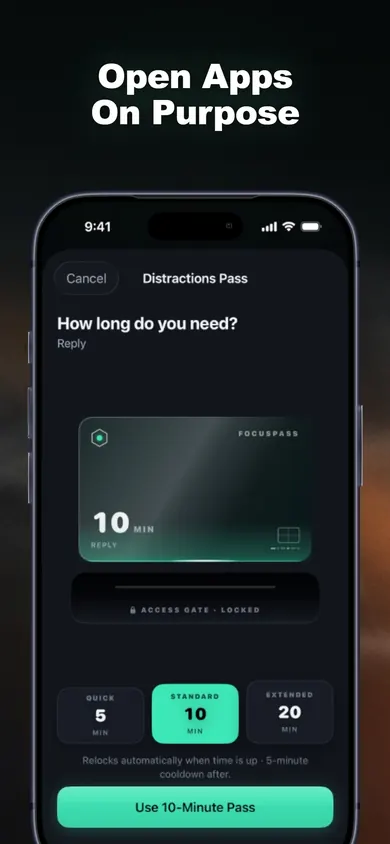
It is 10:55. The Sleep Zone started at 10:30, so the feed app shows a shield that says PROTECTED. A message comes in from a group chat about tomorrow's plan. You tap Use a Pass, choose 5 minutes, pick Reply as the reason, answer the message, and the app closes itself at 11:00.
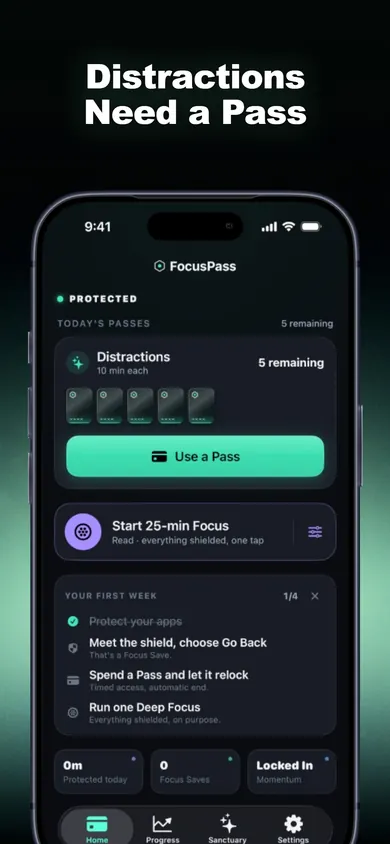
At 11:20 the hand reaches for the phone again, out of habit. The shield appears. You tap Go Back. FocusPass records one Focus Save, which is exactly one tap and nothing more: we decided not to estimate "minutes saved", because we cannot see what you did instead and an invented number would be flattering and useless.
What the situation picker at the top tells you
The four choices above are the four night scrolls we hear about most. Each answer pairs one fact from the list with one setting. The pattern is the same every time: move the decision earlier, keep one honest exit, and let the phone end the session instead of you.
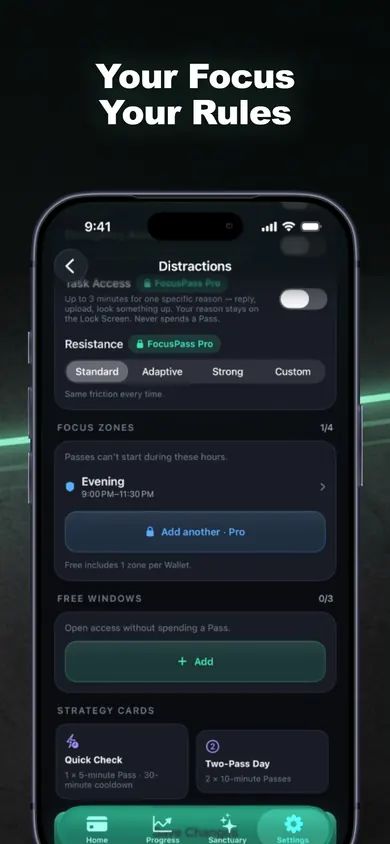
- In bed: a Sleep Focus Zone that starts before you lie down.
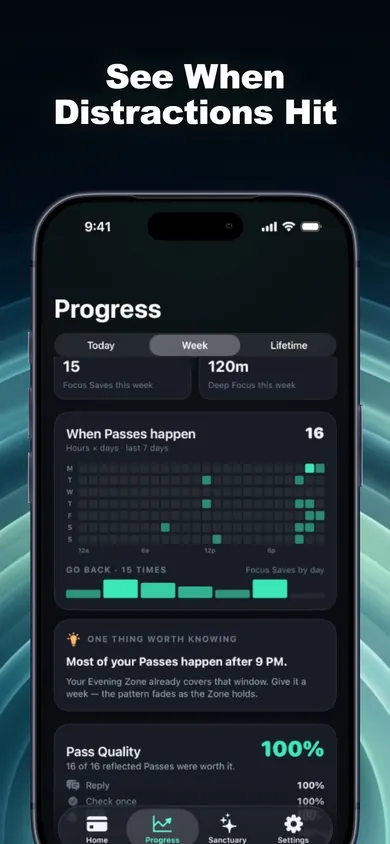
- On the couch: an Evening Zone from 9, and the heatmap to confirm the pattern.
- Awake at 2 a.m.: the zone runs until morning, and the phone charges across the room.
- One work check: a 5-minute Pass with a reason, which relocks on its own.
Proof: the screens behind each fix
Who this fix is not for
If your phone is managed by a parent, school or employer, their Screen Time settings come first and FocusPass cannot override them. If you are on Android, FocusPass will not help; it is iPhone and iPad only, on iOS 18 or later. And if you cannot sleep for reasons that have nothing to do with the phone, an app blocker is the wrong tool: talk to a clinician.
One more honest limit: Turn Off All Protection always works and is never locked behind a purchase. That is deliberate, and it means FocusPass will not stop a determined you at 1 a.m. It makes the easy path the shielded one.
How to set up a night block in 3 steps
- Protect. Pick the apps, categories or websites you scroll with Apple's Screen Time picker. Keep anything essential (alarm, messages from family) in Essentials.
- Zone. Add one Focus Zone for Evening or Sleep. The free plan includes one zone; more zones are part of FocusPass Pro.
- Pass, then relock. When you need an app, use a short Pass with a reason. It relocks when time is up, and a Reset Window can stop back-to-back Passes.
Night scrolling questions
How do I stop doomscrolling in bed?
Decide before bedtime, not in bed. Put the apps you scroll behind a scheduled block for your sleep hours, keep the phone out of reach, and let the block do the arguing. In FocusPass that is a Focus Zone set to Evening or Sleep.
Is scrolling before bed actually bad for sleep?
In a 2025 study of more than 45,000 Norwegian students, each extra hour of screen use after going to bed went with 59% higher odds of insomnia symptoms and about 24 minutes less sleep. It was a cross-sectional survey, so it shows a link, not proof of cause.
Is social media worse than other screens at night?
That same 2025 study found no difference between social media and other screen activities in how screen time related to sleep. A 2025 review of reviews found a small but consistent negative effect of social media use on sleep quality, and a stronger link for problematic use.
How long before bed should I put my phone away?
The CDC suggests turning electronic devices off at least 30 minutes before bedtime.
Can I still check one thing at night with FocusPass?
Yes. At the shield you can choose Use a Pass, pick a length such as 5 minutes and a reason like Check something, and the app relocks on its own when the Pass ends. An optional Reset Window stops one Pass turning into three.
Does FocusPass track my sleep?
No. FocusPass is an app blocker. It records when you use Passes and when you tap Go Back, all on your device, and it does not measure sleep.
Try it tonight
Set one Sleep Zone before 10 p.m. and see how many times you tap Go Back. FocusPass on the App Store is free to start.

Updated November 2026 · facts checked 3 November 2026
Related
- FocusPass: the free iPhone app blocker with timed PassesFocusPass blocks the apps you pick with Apple's Screen Time shield. Need one? Take a 5, 10 or 15-minute Pass and it relocks itself. Free core.
- App blockers that allow temporary access, comparedFocusPass, one sec, Opal, Jomo and ScreenZen compared on one thing: how each lets you back into a blocked app for a few minutes. Checked Nov 2026.
- How to block apps on your own iPhone: a checklistA 5-minute checklist to block apps on your own iPhone: Screen Time settings first, then when an app blocker helps. Take the 3-tap quiz for your list.
- Printable digital detox worksheet for beginnersA free 2-page digital detox worksheet for beginners: a one-evening app audit, three starter rules and a 7-day tally. Print it, no sign-up.