How do you stop checking work email over the holidays?
Decide before your last workday when you will check work email and chat, if at all, then put those apps behind a block that makes you choose each time, and set an out-of-office that names who to contact instead. The research on this is small but encouraging: in a 2015 study, 124 adults spent one week checking email only three times a day and another week checking freely, and they reported lower daily stress in the limited week.
Willpower on 26 December is a bad plan. A rule set on 23 December is a good one.
Proof: what a work-free break looks like in FocusPass
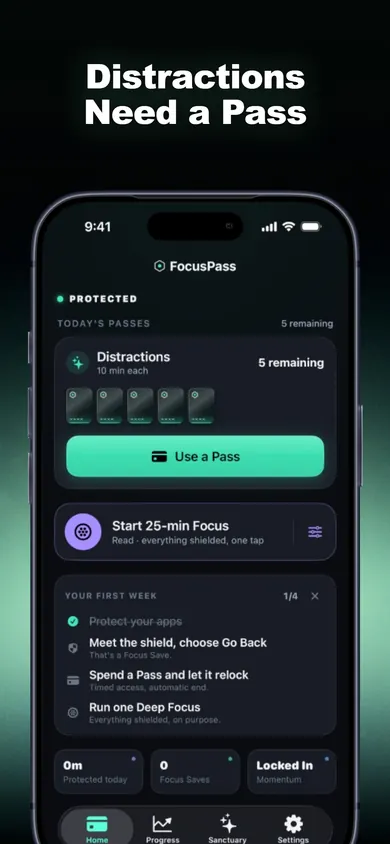
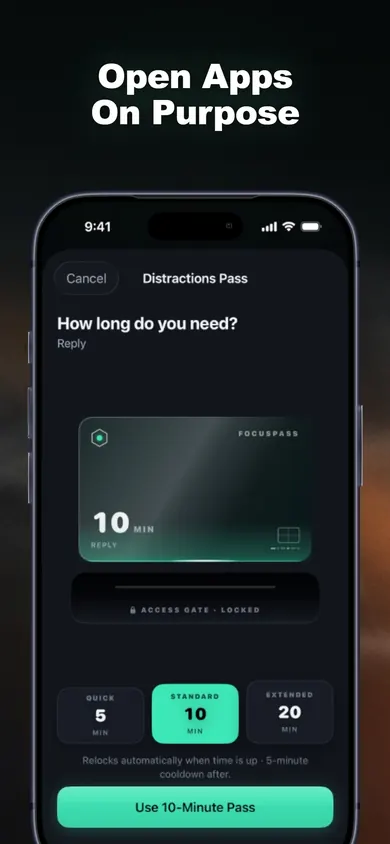
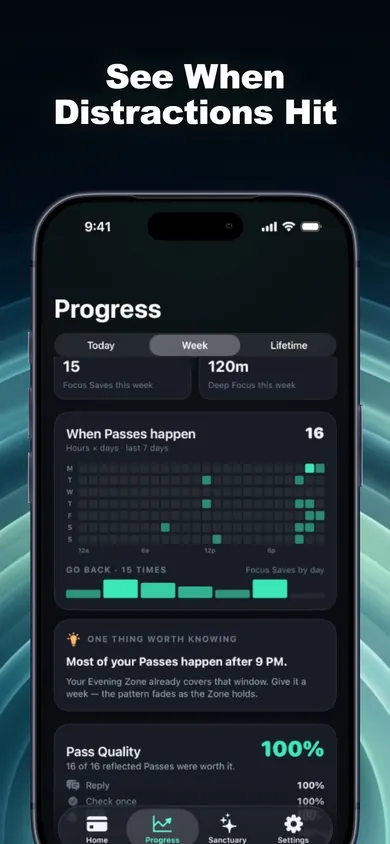
The five-minute setup, before you log off
- Pick the work apps. In FocusPass, choose Mail, Outlook, Slack, Teams or a work site with Apple's Screen Time picker. Leave Phone, Messages and Maps in Essentials so they always open.
- Keep the Pass plan small. A Wallet is a daily Pass plan for a group of apps. Promise yourself one 10-minute Pass a day, with the reason "Check something", and leave the rest unused. (Exact custom Wallet rules are a Pro feature.)
- Add a Focus Zone for the evenings. The free plan includes one Focus Zone. Evening hours are when most people drift back to work apps.
- Set your out-of-office. FocusPass can't do this for you. Your mail app can, and it's the part that stops people waiting on you.
Honest limits
- FocusPass blocks apps on your iPhone and iPad. It doesn't stop email arriving, and it can't touch your laptop.
- Turn Off All Protection always works. That is on purpose: we don't sell a way to trap yourself, so a determined 2 a.m. you can still get in.
- The free plan has one Wallet and one Focus Zone. More Wallets, more Zones and Task Access are FocusPass Pro.
- If an employer or parent manages Screen Time on the phone, their settings come first.
- One design decision we made: each time you tap Go Back at a shield, FocusPass records one Focus Save. It never guesses how many minutes you "saved", because it can't know.
Who should skip this
Anyone on call. If you're the on-call engineer, nurse or manager over the holidays, don't put the paging app behind a shield. Keep it in Essentials and block everything else instead.
People who won't need work apps at all. Signing out of Slack and removing the mail account for eleven days is free and simpler. A blocker earns its place when you might need one quick look.
Anyone whose job expects replies. A rule can't fix a team that never agreed you're off. Settle that first, in writing, before Christmas Eve.
Block the inbox, not the people who might actually need you.
Work email on holiday: questions
How do I stop checking work email on vacation?
Decide before you log off: when you will check, if at all, and for how long. Put Mail, Outlook, Slack or Teams behind a shield that makes you choose Go Back or a short timed Pass, and set an out-of-office that names who to contact instead.
Is it bad to check work email on holiday?
Not always, but how often seems to matter. In a 2015 study in Computers in Human Behavior, 124 adults reported lower daily stress during a week when they limited email checks to three a day than in a week of unlimited checking.
Should I delete Slack from my phone over Christmas?
Deleting works if you won't need it at all. If you might need one quick check, a block with a timed Pass is easier to live with: the app stays installed, and it relocks on its own when the Pass ends.
Can FocusPass block the Mail app?
FocusPass blocks apps, whole categories or websites you pick with Apple's own Screen Time picker. If you choose Mail, Outlook, Gmail or Slack there, opening it shows a native shield first.
Will my boss know I blocked work apps?
No. FocusPass has no account, and your rules and history stay on your device. It doesn't send read receipts, statuses or messages to anyone.
Does it work on a work phone?
If your company manages the phone's Screen Time, their settings come first, and some managed devices may not allow it. Check with IT before relying on it.
Worked example: one rule for Dec 24 to Jan 3
Here's the plan the counter above assumes, written out with real dates for the 2026 break. Change the apps and times to fit your job.
- Last workday. Out-of-office on, naming a colleague. In FocusPass, Mail and Slack go into a "Work" Wallet. Your own rule: one 10-minute Pass a day.
- First reach for Slack hits the shield. Go Back. That's your first Focus Save.
- A real question from a client. Use the day's Pass, reply, and the app relocks when the 10 minutes end, even if you forget.
- Open Progress. The heatmap shows when you reached for work apps; the Weekly Review counts Go Backs, not guesses.
- Back at work. Turn the Wallet off or keep the evening Focus Zone for January.
With six opens a day over eleven days, that's 66 trips into work apps. Keep to one Pass a day and it's 11 at most, each with a timer. Your numbers will differ; the counter just does the arithmetic on yours.
Try it tonight
Set the rule now, while the break is still weeks away. Get FocusPass on the App Store.

Updated November 2026
Related
- FocusPass: the free iPhone app blocker with timed PassesFocusPass blocks the apps you pick with Apple's Screen Time shield. Need one? Take a 5, 10 or 15-minute Pass and it relocks itself. Free core.
- App blockers that allow temporary access, comparedFocusPass, one sec, Opal, Jomo and ScreenZen compared on one thing: how each lets you back into a blocked app for a few minutes. Checked Nov 2026.
- How to block apps on your own iPhone: a checklistA 5-minute checklist to block apps on your own iPhone: Screen Time settings first, then when an app blocker helps. Take the 3-tap quiz for your list.
- Block apps while studying: a free study-block plannerNew to app blockers? Plan one study block in three taps, then scratch to reveal your phone rule card: what to block, what to keep, how many Passes.