Set up your study block
Three choices. The rule card above updates and covers itself again.
How do you block apps while studying?
To block apps while studying, choose the apps and sites that pull you away, protect them for the exact hours you study, and keep a small, timed way back in for the one or two things you really need. That last part is what beginners skip, and it is why the first blocker they try gets switched off on day two.
On iPhone, nearly every blocker, including ours, sits on Apple's Screen Time system. You pick apps, whole categories (Social, Games, Entertainment) or websites in Apple's picker. When you open one during a protected window, iOS shows a shield instead of the app.
Does the phone even matter if it is face down? a 2017 study in the Journal of the Association for Consumer Research found people did worse on memory tests with their phone on the desk. a 2022 replication in Acta Psychologica did not find the effect. So the evidence on mere presence is mixed; what is not in doubt is that a quick look costs the minutes it takes.
Who this is not for
- Your parents manage your phone. Their Screen Time settings come first; ask them to set study hours there.
- You need zero way out. FocusPass always lets you turn protection off. If that is too easy, put the phone in another room or use a stricter tool.
- You study on a laptop. FocusPass blocks on iPhone and iPad. Your laptop needs its own blocker.
- You are on Android. It is iPhone and iPad only, iOS 18 or later.
What it looks like on the phone
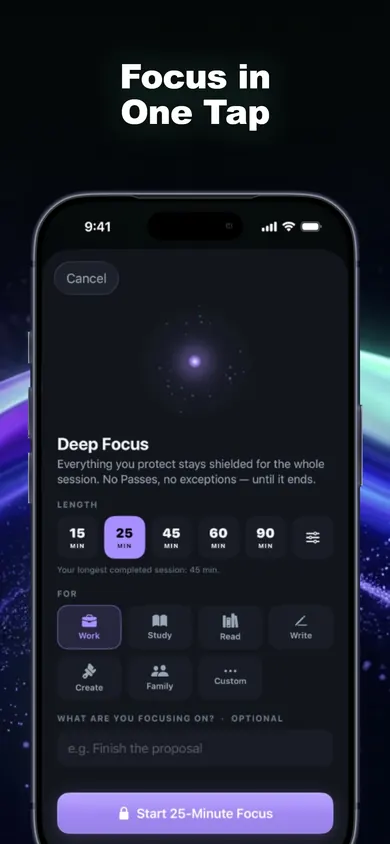
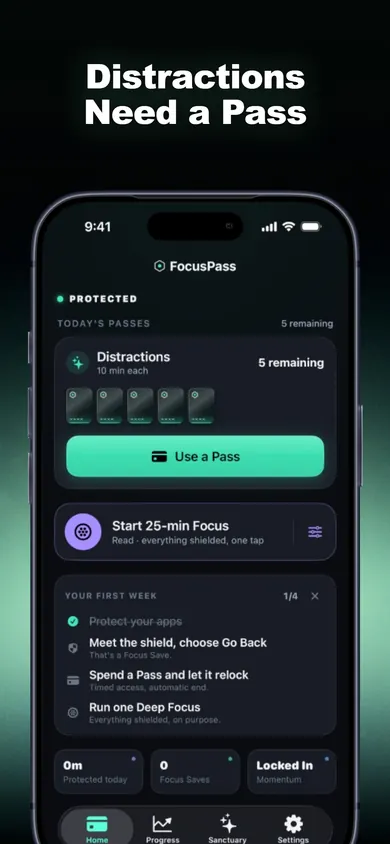
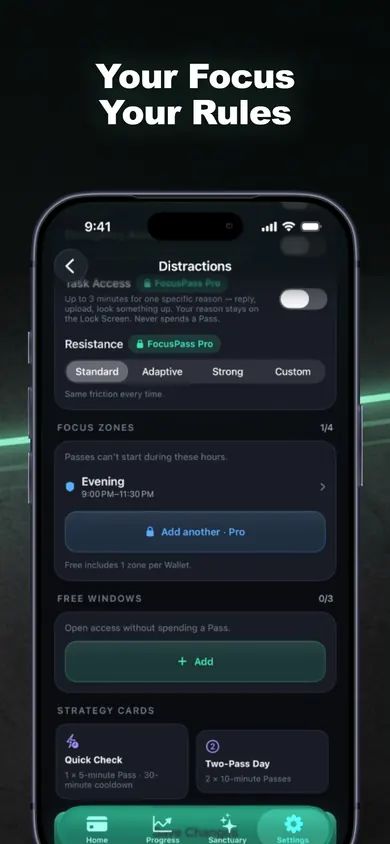
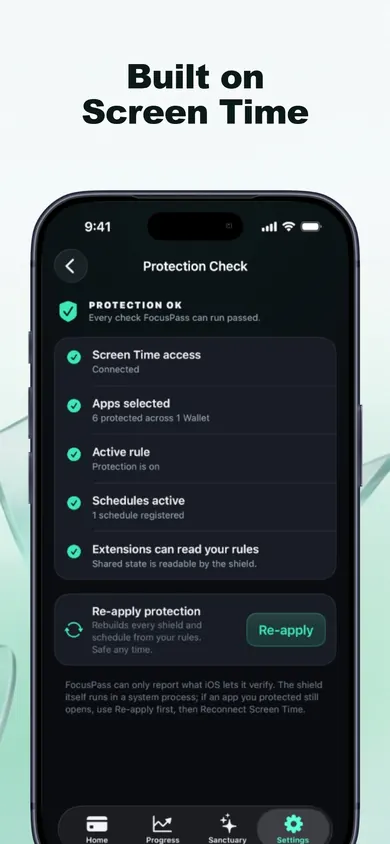
Beginner options for studying without your phone, compared
Phone in another room
Free and strong. Loses music, login codes and the group chat you actually need.
iPhone Focus mode
Silences notifications. Does not stop you opening an app yourself.
Screen Time App Limits
Daily totals, not study hours. You can add more time from the limit screen.
Forest
Grow a tree while you focus; leave for other apps and it dies. Its Deep Focus blocks selected apps during a session.
FocusPass (we make it)
Shields for set hours, plus timed Passes for the one thing you need. Relocks on its own.
The night before the stats final
It is a Tuesday in mid-December. The plan is two hours on regression. Last week the same plan lasted eleven minutes before a video, then a group chat about the exam, then a video about the exam.
This time the Study Zone starts at 7:00. Social and Entertainment are shielded; music and the login-code app are Essentials. At 7:40 the group chat buzzes. The shield offers Go Back or a Pass. A 5-minute Pass marked Reply, two messages, and the app locks again on its own. At 8:20 the urge comes back with no message behind it, and Go Back is the easier tap. That is one Focus Save. Not a miracle; two hours that were mostly regression.
Questions beginners ask
How do I block apps while studying on iPhone?
Pick the apps, categories or sites you lose time to, then protect them for the hours you study. FocusPass uses Apple's own Screen Time picker for this, and a Study Focus Zone keeps them shielded for the hours you set. Keep music and authenticator apps as Essentials so you are never locked out of what you need.
Is iPhone Focus mode enough to stop me opening apps?
Focus mode mainly silences notifications and can hide Home Screen pages. It does not put a shield in front of an app you open yourself, which is the moment most study sessions break.
Can I still reply to my group chat while apps are blocked?
Yes, on purpose. Use a Pass: pick 5, 10 or 15 minutes and an optional reason like Reply. The app locks again when the Pass ends, even if FocusPass is closed.
How long should a study session be?
There is no single right number. Start with the length you can actually finish today, often 25 to 45 minutes for a beginner, and add time once that feels easy. FocusPass Deep Focus offers 25, 45, 60 and 90 minutes.
Is FocusPass free for students?
The free plan includes native shields, Go Back and Focus Saves, timed Passes, automatic relocking, one Wallet, one Focus Zone, one Deep Focus session a day and 7-day insights. Unlimited Deep Focus, more Zones and Task Access are part of FocusPass Pro.
What if my school manages my iPhone?
If a parent or organisation manages Screen Time on your phone, their settings come first and FocusPass cannot change them.
Honest limits
- The free plan includes one Deep Focus session a day and one Focus Zone. For a long revision day, the Zone does the heavy lifting; unlimited Deep Focus is Pro.
- FocusPass counts Go Back taps as Focus Saves. It does not claim to know how many minutes you saved or what grade you will get.
- Turn Off All Protection always works. We kept it so a blocker never traps you, which also means it cannot hold you against your will.
Open FocusPass in the App Store
Set one Study Zone tonight, keep music as an Essential, and give yourself two Passes.

FocusPass on the App Store · free, no account · Updated November 2026
Related
- FocusPass: the free iPhone app blocker with timed PassesFocusPass blocks the apps you pick with Apple's Screen Time shield. Need one? Take a 5, 10 or 15-minute Pass and it relocks itself. Free core.
- App blockers that allow temporary access, comparedFocusPass, one sec, Opal, Jomo and ScreenZen compared on one thing: how each lets you back into a blocked app for a few minutes. Checked Nov 2026.
- How to block apps on your own iPhone: a checklistA 5-minute checklist to block apps on your own iPhone: Screen Time settings first, then when an app blocker helps. Take the 3-tap quiz for your list.
- How to stop bypassing your own Screen Time limitsYou set the limit, then you type your own passcode. Tap your bypass moment for the fix, and compare 5 setups by how hard they are to get past.