Which app helps when your to-do list is overwhelming?
The right app depends on where the overwhelm sits: if you cannot start, use a one-task starter such as Now; if tasks feel too big, a task-breaker such as Goblin Tools; if you can start but never finish the list, Llama Life; and if the whole day is chaos, a visual planner such as Tiimo or Structured. We make Now, so weigh our view accordingly. Everything below about the other four comes from their App Store listings, which we read on 3 November 2026.
A longer list is rarely the fix for a list that is too long.
Five to-do apps for overwhelm, compared
| App | What it does about overwhelm | Free part | Paid (US, as listed) | Needs |
|---|---|---|---|---|
| Now (ours) | One task on screen, one concrete first step, a two-minute start; a Stuck button; up to three tasks a day, the rest parked | All of that, plus Brain Dump, focus timers, reminders, export | Pro $4.99/mo, $29.99/yr, $59.99 lifetime | iOS 18+ |
| Goblin Tools | Magic ToDo breaks a task into steps; Compiler turns a brain dump into actions; Taskmaster works through a list one step at a time | The goblin.tools website | $0.99 app; Pro $3.99/mo or $39.99/yr | iOS 15+ |
| Llama Life | A countdown timer for every task, total List Time and an estimated finish time, one task at a time | 7-day free trial | Monthly or annual; listed from $4.00/mo to $39.00/yr | iOS 16+ |
| Tiimo | Visual daily schedule, to-do list with AI priority grouping, focus timer, calendar sync | Basic planner, limited AI chats, 1 profile | Tiimo Pro; listed prices vary by plan, up to $54.00 | iOS 18+ |
| Structured | A visual timeline of your day; inbox for quick capture; sub-tasks; Pomodoro timer | Timeline, inbox, sub-tasks, Pomodoro, widgets, sync | Pro monthly, yearly or $99.99 lifetime | iOS 18+ |
Sources: the US App Store listings for Goblin Tools (Skyhook), ADHD Organizer: Llama Life, Tiimo: To-Do List Planner, Structured: Daily Planner Todo and Now, read 3 November 2026. Developer sites: goblin.tools, llamalife.co, tiimoapp.com, structured.app. In-app prices shown on a listing can include several plans and regions; check before you buy.
Who should pick what
- Pick Goblin Tools if your trouble is that tasks feel shapeless. It is a toolbox: the same app also rewrites messages, estimates time and suggests recipes. The website is free if you want to try the idea first.
- Pick Llama Life if you can start but lose the afternoon. A timer on every task plus an estimated finish time makes time visible. It is subscription-only after the trial.
- Pick Tiimo if you think in pictures and want an AI co-planner to build the day with you, and you are happy to pay for Pro for the full set.
- Pick Structured if you want your calendar and tasks on one timeline. The free tier is generous; calendar connection and AI planning are Pro.
- Pick Now if the list itself is the problem: you want to see one thing, start it for two minutes, and let everything else wait without guilt.
How Now shrinks an overwhelming list in 3 steps
- Empty your head. Brain Dump gives you one big box. Type everything, or dictate with the keyboard's microphone. Now splits it into tasks, and nothing is lost.
- Keep three. The daily plan holds one main task, one smaller task and one optional bonus. Everything else goes to the parking lot: Later, Someday or Waiting.
- Start one. The Now screen shows one task and one first step. Tap Start for two minutes. If it still feels impossible, tap I'm stuck and pick what's in the way.
One design decision we made: unfinished tasks never pile onto tomorrow. A to-do app that greets you with yesterday's leftovers is a to-do app that makes the overwhelm worse, so tomorrow starts with a clean three.
Proof: Now's own screens
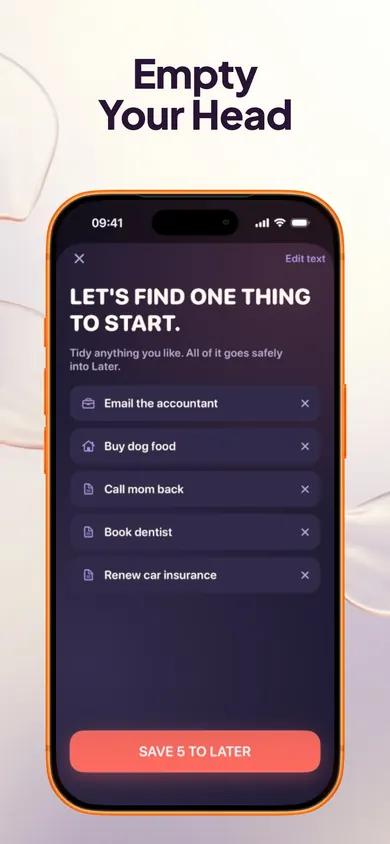
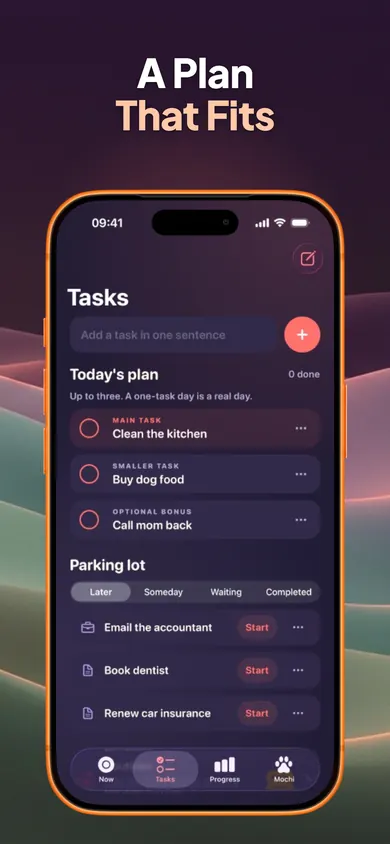
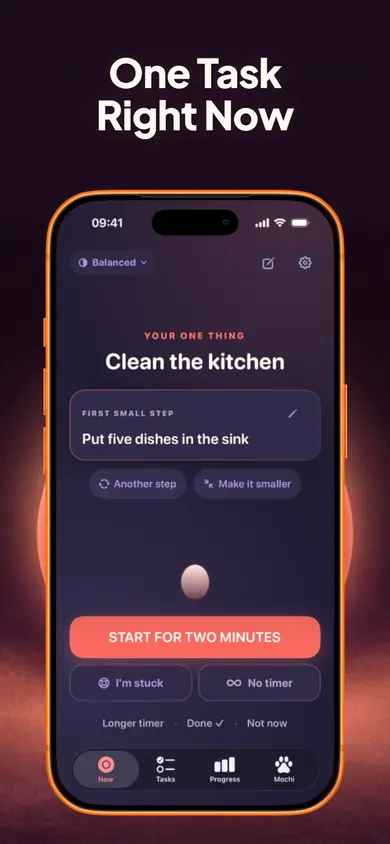
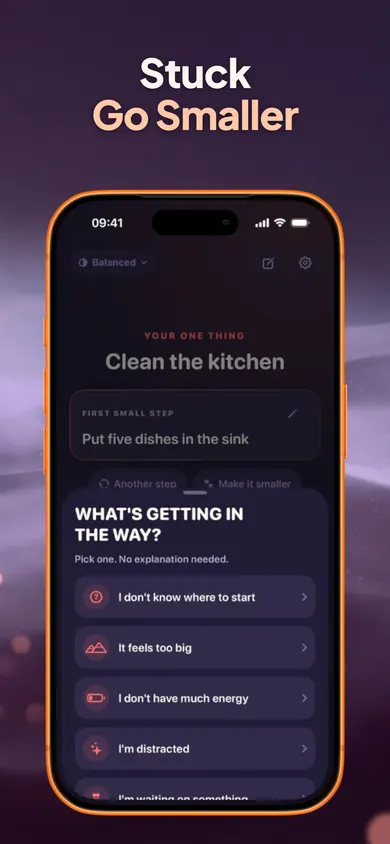
Who Now is not for
If you manage projects with deadlines, collaborators and due dates, Now is too small on purpose; a full task manager or one of the planners above will suit you better. If you need your tasks on Android, a laptop or shared with family, Now keeps everything on your iPhone with no account. And if you want an app to plan your whole day hour by hour, pick Tiimo or Structured; Now only ever asks what you are doing next.
- Routines, full Time Mirror history and CSV export are Now Pro.
- Optional one-time purchases for Mochi, the companion, only change how it looks.
- Now is not ADHD treatment and does not diagnose or manage any condition.
To-do list overwhelm questions
What app helps when your to-do list is overwhelming?
It depends on the kind of overwhelm. If you cannot start, a one-task app like Now or a task-breaker like Goblin Tools' Magic ToDo fits. If the list is long but you can work through it, Llama Life's timer per task fits. If the day itself is chaotic, a visual planner like Tiimo or Structured fits.
Why does a long to-do list make it harder to start?
Every item on screen is a choice, and choosing is work. Many people, including many with ADHD, find that seeing 30 tasks at once makes picking the first one harder. Hiding all but one task is the idea behind Now's single-task screen.
Is Now free?
The one-task screen, two-minute starter, Stuck button, task breakdown, unlimited tasks, Brain Dump, focus timers, daily plan and parking lot, reminders, Quiet Mode and full data export are free. Now Pro ($4.99/month, $29.99/year or $59.99 lifetime in the US) adds routines, full Time Mirror history and insights, and CSV export.
Does Now use AI to break down tasks?
Now's listing says it suggests a first step, such as "Put five dishes in the sink" for "Clean the kitchen", and that Brain Dump splits what you type into tasks. It does not describe the method. Your tasks are stored on your iPhone and are never sent.
Is Goblin Tools free?
The website goblin.tools is free. The iPhone app costs $0.99 to download, and Goblin Tools Pro ($3.99 a month or $39.99 a year in the US) adds sync, templates, sharing and history.
What happens to the tasks I don't do today in Now?
They wait in a private parking lot (Later, Someday, Waiting, Completed). Nothing is automatically deleted, and unfinished tasks never pile onto tomorrow.
Is Now an ADHD treatment?
No. Now is a productivity-support tool. It does not diagnose, treat or manage ADHD or any medical condition.
Download free on the App Store
Dump the list, keep three, start one for two minutes. Now on the App Store is free with no account.

Updated November 2026
Related
- Now: one task, one small step, two minutesNow shows one task, one concrete first step and a two-minute timer. Tap I'm stuck to go smaller. Free on iPhone, no account.
- 2-minute rule vs Pomodoro for ADHDPomodoro asks for 25 minutes up front; the 2-minute rule asks for two. Slide to compare them on a real task, and see when each one wins.
- ADHD time estimate calculator (your own multiplier)Enter three past tasks, guessed vs real minutes, and get your personal time multiplier, then a realistic start time. Free, runs in your browser.
- Why can't I start tasks I want to do?Wanting to do it and starting it are different skills. Tap what's in your way for one next move, then read 12 straight answers. No account needed.