How do you start a task when you have ADHD?
Shrink the task to one concrete first step, then commit to just two minutes of it; starting is the hard part, and a tiny, timed start is easier to say yes to. That is the whole idea of Now.
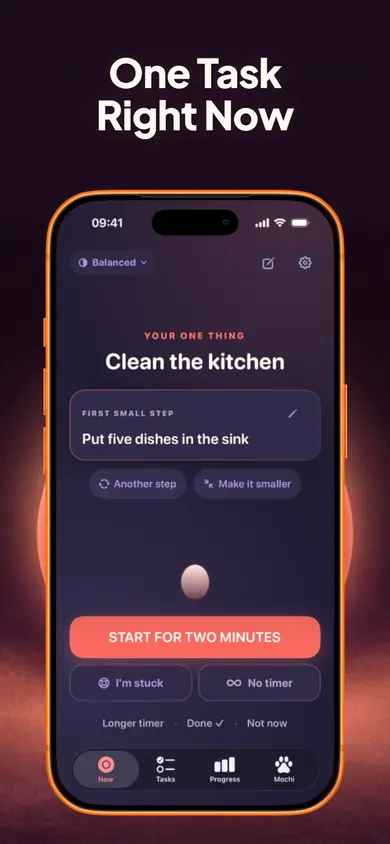
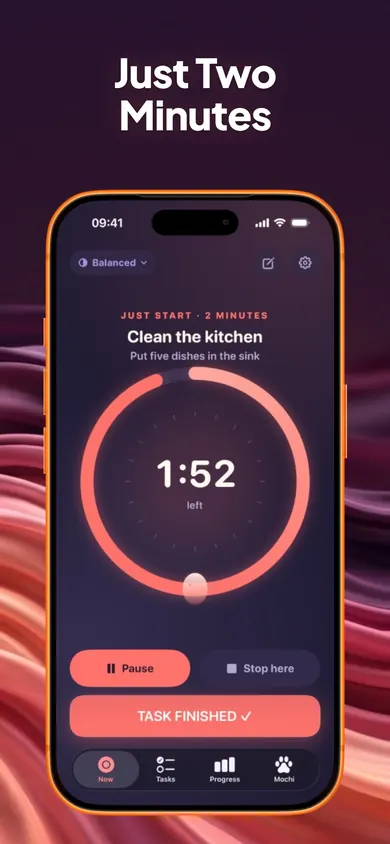
Type "Clean the kitchen" and Now suggests a first step like "Put five dishes in the sink". You can edit it, choose another, or make it smaller. Then one big button starts a calm two-minute ring. Ending early still counts. Keep going if you want to.
Now is a productivity-support tool. It does not diagnose, treat or manage ADHD or any medical condition. This is general information, not medical advice. Talk to your clinician.
When you are stuck, go smaller
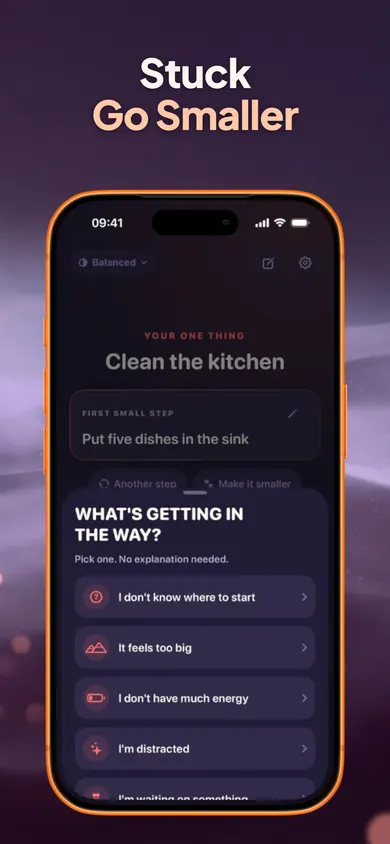
Tap I'm stuck and pick what is in the way. No explanation needed. Each answer gives one next move:
- I don't know where to start → 2 to 5 editable steps
- It feels too big → the tiniest version of the task
- Low energy, distracted, waiting on something → one practical next move
- I need a break → a timed break, then back
The answer to "I can't start" is almost never "try harder". It is "smaller".
A tour of Now
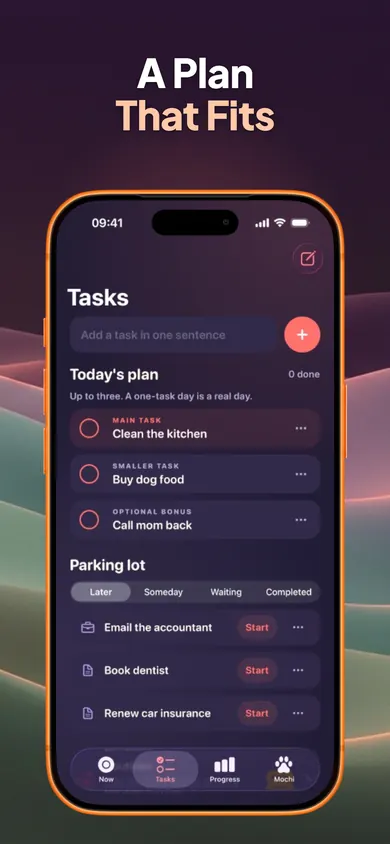
What else is in the ADHD task starter
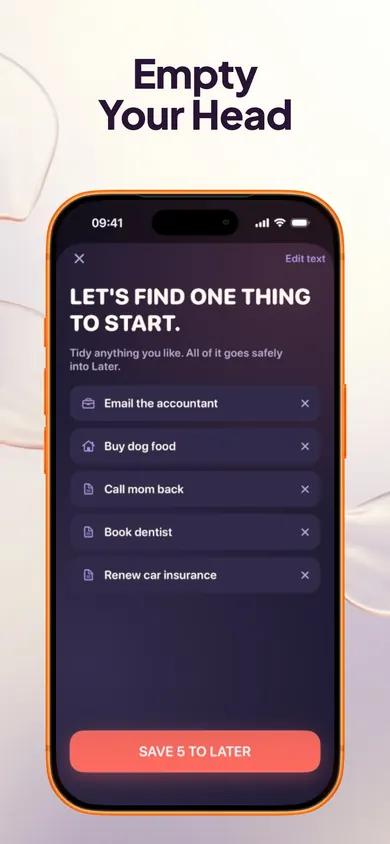
- Brain Dump. One big box; type or dictate with the keyboard mic. Now splits it into tasks.
- Daily plan. One main, one smaller, one optional bonus. Unfinished tasks never pile onto tomorrow.
- Energy modes. Comfy, Balanced or Turbo, changeable anytime.
- Time Mirror. Compares your estimates with the time you actually recorded.
- Mochi. An optional companion that naps while you focus and is never needy or sad.
- Quiet Mode. Just the task, the timer and the next step. Works with VoiceOver, Dynamic Type and Reduce Motion.
Free, and what Pro adds
Free forever: the one-task screen, two-minute starter, Stuck button, task breakdown, unlimited tasks, Brain Dump, focus timers, daily plan and parking lot, reminders, Quiet Mode and full data export.
Now Pro: routines, full Time Mirror history and insights, full task history with CSV export, premium Mochi customization. $4.99/month, $29.99/year or $59.99 once (US prices). Optional cosmetic characters only change how your companion looks.
A decision we made on purpose
Mochi is never sad. A lot of habit apps guilt you with a wilting plant or a crying pet. For people who already feel behind, that is the last thing that helps. So Mochi naps while you work, celebrates quietly when you finish, and simply waits when you don't.
Who should pick something else
If you manage big projects with dependencies, deadlines and a team, you want a full task manager; Now deliberately shows one task at a time and caps the daily plan at three. It is iPhone only, and it is not a treatment for anything.
Questions about getting started
Is Now free?
Yes. Free forever covers the one-task screen, two-minute starter, Stuck button, task breakdown, unlimited tasks, Brain Dump, focus timers, daily plan and parking lot, reminders, Quiet Mode and full data export. Now Pro ($4.99 a month, $29.99 a year or $59.99 once, US prices) adds routines, full Time Mirror history and insights, full task history with CSV export, and premium Mochi customization.
Why only two minutes?
Because the hard part is usually the start, not the task. Two minutes is short enough to say yes to. When the ring finishes you can stop, and that still counts, or keep going with 5, 10, 15 or 25 minutes, a custom length, or no timer.
What does the I'm stuck button do?
You pick what is in the way: don't know where to start, too big, low energy, distracted, waiting on something, or need a break. Each answer gives one practical next move, like 2 to 5 editable steps, the tiniest version of the task, or a timed break.
Does Now diagnose or treat ADHD?
No. Now is a productivity-support tool. It does not diagnose, treat or manage ADHD or any medical condition. It is built for anyone who finds starting hard.
Do I need an account?
No. Tasks, notes and history stay on your iPhone, and you can export or delete them anytime. Your tasks are never sent anywhere.
What if Mochi is too much?
Hide it with one switch. Quiet Mode also hides decoration, turns off Sparks and rewards, reduces animations and silences sounds.
Do unfinished tasks pile up?
No. The daily plan holds up to three tasks. Unfinished ones never roll onto tomorrow, and everything else waits in the parking lot: Later, Someday, Waiting or Completed.
Start one thing in two minutes
Not the whole list. One thing. The smallest step of it.

Updated November 2026
More about Now
- College students with ADHD: the statistics, sourcedHow many college students have ADHD, how they rate their strengths, and how grades and enrollment compare. Every number linked to its source.
Related
- College students with ADHD: the statistics, sourcedHow many college students have ADHD, how they rate their strengths, and how grades and enrollment compare. Every number linked to its source.
- Why app blockers don't work, and what to try insteadMost app blockers fail at the moment you want more time. We compare how Screen Time, one sec, Opal, ScreenZen and Time Debt handle it. Checked Nov 2026.
- Is my attention span getting shorter? Six myths checkedThe 8-second goldfish claim, the 10-minute lecture limit and four more attention myths, checked against the studies they came from.
- Attention Age: a five-minute attention span testA five-minute attention span test for iPhone: three timed tasks, a 0-100 Attention Index explained in plain language, then daily practice.