
Updated November 2026
Dear you, with the pile,
How do you catch up on life admin with ADHD?
Get every item out of your head and onto one list, then work on one item a day for just two minutes, starting with the smallest physical step. Catching up in one heroic Saturday rarely happens, because the hardest part is starting, not the work itself. A week of tiny starts usually clears more than a weekend of dread.
You are in good company. Trouble remembering daily tasks, disorganization and procrastination are among the ways ADHD symptoms can cause problems in daily life, according to NIMH's ADHD: What You Need to Know (2024), and NIMH (page reviewed August 2026) notes that adults with ADHD are at increased risk of financial problems. Unopened bills are rarely about money alone. They are often about starting.
Three ways to catch up, compared
What the first week felt like, in one Tuesday
Picture it. A car insurance renewal has been on the counter for three weeks. On Tuesday the task in Now reads Renew car insurance, and the first small step reads Find the renewal letter. You tap Start for two minutes. The letter is under the fruit bowl. The ring still has a minute and twenty seconds left, so you read the price. Then you tap I'm stuck, choose It feels too big, and the next move shrinks to Find the policy number. Done. You stop there, and it still counts. Wednesday's step is the phone call.
Two minutes is not the goal. Starting is the goal; two minutes just gets you through the door.
Your first-week life admin plan
- Day 1 · Empty the pile. Open Brain Dump and type, or dictate with the keyboard microphone, everything you owe anyone. Now splits it into tasks and nothing is lost. Stop when the box is empty.
- Day 2 · Pick one. Put one admin task in today's plan as the main thing. Accept or edit the suggested first step. Tap Start for two minutes.
- Day 3 · Use I'm stuck. Take the scariest item. Tap I'm stuck and pick what's in the way: too big, don't know where to start, low energy. Each answer gives one practical next move.
- Day 4 · Park the waiting. Anything waiting on someone else (a refund, a callback) goes to Waiting in the parking lot, so it stops nagging at you from the main list.
- Day 5 · Go a little longer. After your two-minute start, choose 10 or 15 minutes for a small batch, such as three bills. Breaks are built in.
- Day 6 · Check your guesses. Time Mirror compares how long you thought tasks would take with the time you recorded. Full Time Mirror history is a Pro feature.
- Day 7 · Look, don't judge. Progress shows tasks finished, two-minute starts and days with a finished task. Pick next week's one main thing per day.
Unfinished tasks never pile onto tomorrow, and nothing in the parking lot is deleted automatically. A missed day costs you nothing but the day.
Proof: the screens you'll use this week
 Day 1: all of it, here
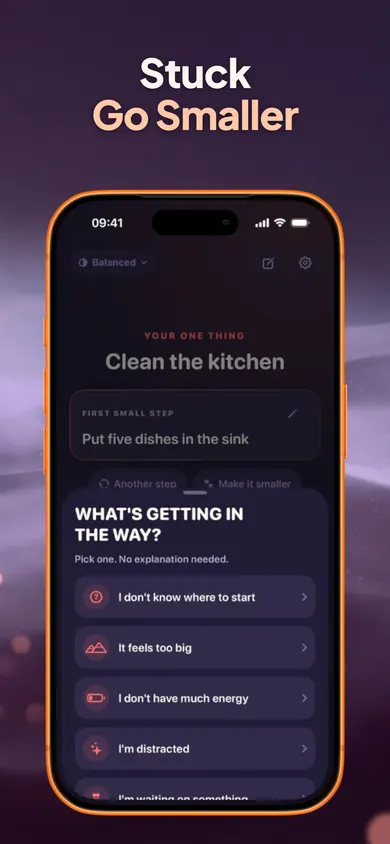 Day 3: pick one
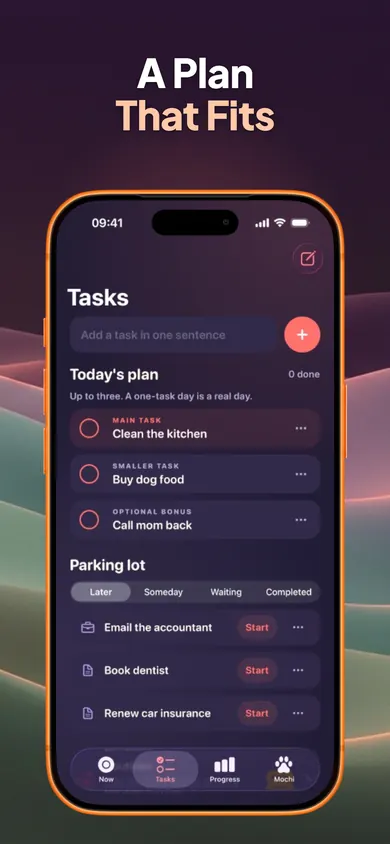 Day 4: Waiting tab
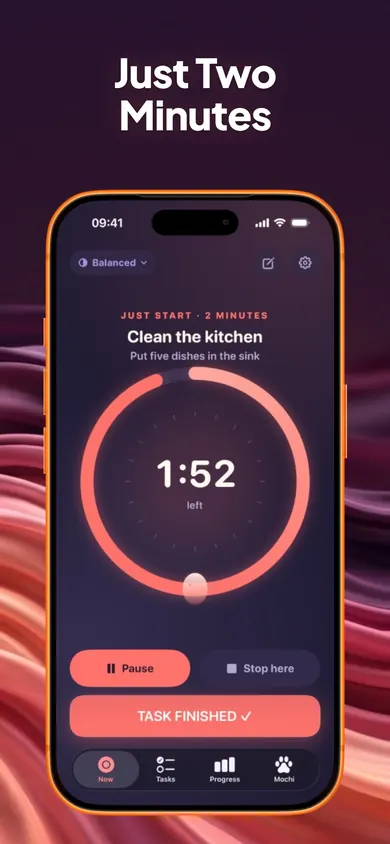 Ending early counts
Who should use something else
If your admin is mostly shared household jobs, a shared to-do app your partner also uses will help more than a personal starter. If you are behind on debts or taxes and the stakes are high, a person, such as a free debt advice service or an accountant, is worth more than any app. And if you love detailed project lists with tags and due dates, Now will feel deliberately sparse.
Honest limits
- Now does not read email, scan paper or pay anything. You still open the envelope.
- Step suggestions are a starting point. You can edit them, ask for another, or make them smaller.
- Your data stays on your iPhone with no account. That also means no web or Android version.
One decision we made on purpose: the daily plan stops at three tasks. A fourth slot looks helpful and quietly brings the dread back.
Life admin questions
How do I start catching up on a big pile of life admin?
Write the whole pile down first, then pick just one item and its smallest first step. Starting is usually harder than doing, so the first goal is two minutes, not the pile.
How long does it take to catch up on life admin?
It depends on the pile, and guessing usually goes wrong. Give it a week of short daily starts, then look at what you actually finished. Now's Time Mirror compares your estimates with the time you really recorded.
What counts as life admin?
The unpaid paperwork of being an adult: bills, forms, renewals, appointments, returns, insurance, school or work emails, and the calls nobody wants to make.
Does Now connect to my email or bank?
No. Now is a task starter. It holds your tasks on your iPhone with no account, and it does not read email, pay bills or scan documents.
Is Now an ADHD treatment?
No. Now is a productivity-support tool and does not diagnose, treat or manage ADHD or any medical condition. If you think you might have ADHD, talk to your clinician.
Is Now free?
Yes. The one-task screen, two-minute starter, Stuck button, task breakdown, unlimited tasks, Brain Dump, focus timers, daily plan, parking lot, reminders, Quiet Mode and full data export are free forever. Now Pro ($4.99 a month, $29.99 a year or $59.99 once, US prices) adds routines, full Time Mirror history and CSV export of task history.
Related
- Now: one task, one small step, two minutesNow shows one task, one concrete first step and a two-minute timer. Tap I'm stuck to go smaller. Free on iPhone, no account.
- ADHD cleaning app: a first week of two-minute startsLooking for an ADHD cleaning app? Play the 20-second version, then follow a 7-day plan of two-minute starts for the room you keep avoiding.
- ADHD mom printable to-do list: free 2-page PDFA free printable to-do list for moms who find starting hard: 3 tasks max, a parking lot, and 24 first-step cards for the fridge. No email needed.
- ADHD time estimate calculator (your own multiplier)Enter three past tasks, guessed vs real minutes, and get your personal time multiplier, then a realistic start time. Free, runs in your browser.