What makes an ADHD cleaning app actually work?
An ADHD cleaning app works when it shrinks the moment of starting: one task, one concrete first step you can see, and a short timer you are allowed to stop. Most cleaning apps answer “what should I clean?” For a lot of people the real question is “how do I begin the thing I already know needs doing?”
the NIH's National Institute of Mental Health (reviewed 2026) describes inattention as having difficulty paying attention, keeping on task, or staying organised, and notes that symptoms usually continue into adulthood. A kitchen is all three at once: dozens of small decisions with no obvious first move. Now is built for that first move. It is not a diagnosis tool or a treatment; it is a way in.
Honest limits before your first week
- Now will not tell you how to clean. No room templates, no chore schedules, no cleaning checklists. You type the task; it helps with the first step.
- It is a solo app. No accounts and no shared household lists. Splitting chores with a partner or housemates needs a different tool.
- Routines are Pro. If you want a repeating Sunday reset built in, that is part of Now Pro. One-off tasks, timers, Brain Dump and the daily plan are free.
- We made Mochi optional on purpose. The small companion naps while you focus and is never sad, but some people want only the task. Quiet Mode hides it.
Your first week with an ADHD cleaning app, day by day
Pick the room you avoid most. The week below rewrites itself around it: one two-minute start a day, each using a different part of Now.
- Day 1Put five dishes in the sink
One task, one step, Start for two minutes. Stop when the ring ends if you want; it still counts.
- Day 2Brain Dump every kitchen job, then pick one
One big box for everything. Now splits it into tasks, and nothing is lost.
- Day 3Too big? Wipe only the stove top
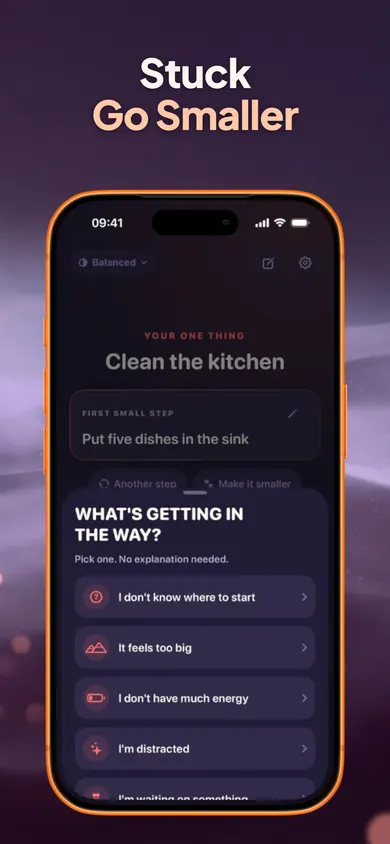
Tap I'm stuck, then It feels too big. Take the tiniest version.
- Day 4Low energy: Comfy pace, clear one shelf of the fridge door
Switch the pace to Comfy. Small days are real days.
- Day 5Estimate “unload the dishwasher”, then time it
Time Mirror compares your guess with the time you actually recorded.
- Day 6Plan: main = dishes, small = bin out, bonus = counters
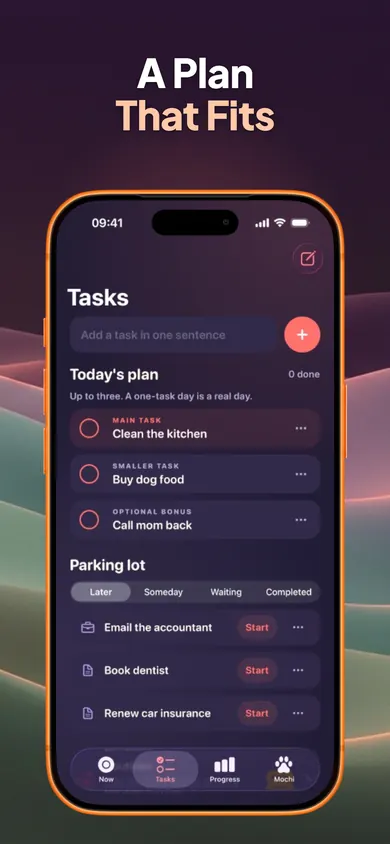
The daily plan holds three: main, smaller, optional bonus. The rest waits in the parking lot.
- Day 7Look at your two-minute starts, not the kitchen
Progress counts finished tasks and two-minute starts, not a clean house.
The first steps are our suggestions. In the app, Now suggests its own first step and you can edit it, choose another, or make it smaller.
The screens you'll use this week
How it works in 3 steps
Type the task
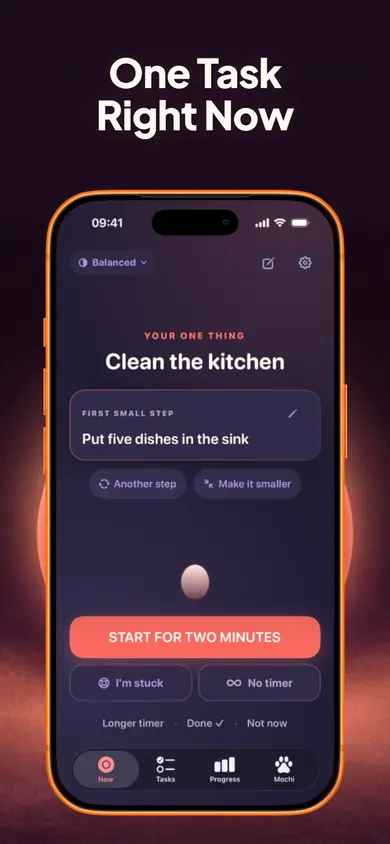
“Clean the kitchen.” Now suggests a first step like “Put five dishes in the sink.” Edit it, swap it, or make it smaller.
Start for two minutes
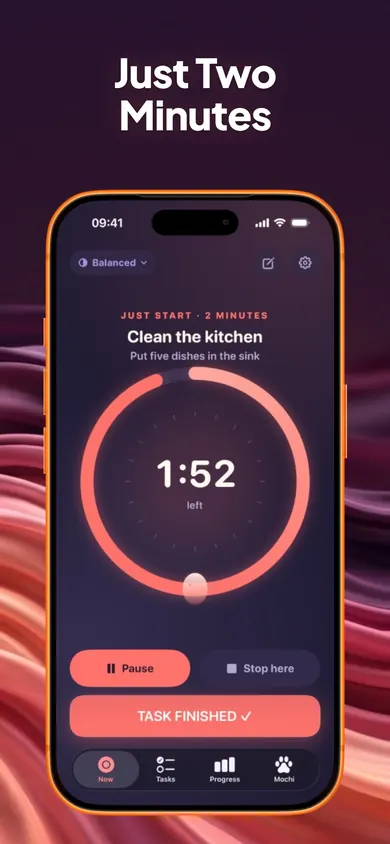
A calm ring counts down. Pause, stop early or keep going. Then pick 5, 10, 15 or 25 minutes, or no timer at all.
Park the rest
Everything else waits in Later, Someday or Waiting. Unfinished tasks never pile onto tomorrow.
Tonight, 9:15 p.m.
The kitchen has been “a weekend job” for three weekends. You open Now. It says Clean the kitchen, and under it, smaller: Put five dishes in the sink. That sounds silly, which is the point.
You tap Start for two minutes. Five dishes take forty seconds. The ring is still going, so you run the tap, and by the time it ends the first rack is full. You tap Task finished, rinse the rack, and stop. The kitchen is not clean. It is started, and tomorrow's first step is already obvious.
A clean kitchen is the goal. A started kitchen is the win.
Questions about ADHD cleaning apps
What is the best ADHD cleaning app?
The one that gets you to the first dish. Some apps give room-by-room checklists or schedules; Now gives one task, one small first step and a two-minute timer. If your problem is knowing what to clean, pick a checklist app. If your problem is starting, pick a starter.
Is Now a cleaning app?
Not only. Now is a task starter for anything that is hard to begin, and cleaning is one of the most common uses. It has no room templates or chore rotations; you type the task, like Clean the kitchen, and get one concrete first step.
Does the two-minute timer really help?
It lowers the cost of starting. You only promise two minutes, you can stop early and it still counts, and the timer keeps correct time when the phone is locked. Many people keep going; the app does not require it.
What does the I'm stuck button do?
You pick what is in the way: don't know where to start, too big, low energy, distracted, waiting on something, or need a break. Each answer gives one practical next move, such as 2 to 5 editable steps, the tiniest version of the task, or a timed break.
Is Now free?
The one-task screen, two-minute starter, Stuck button, task breakdown, unlimited tasks, Brain Dump, focus timers, daily plan, parking lot, reminders and Quiet Mode are free. Now Pro ($4.99 a month, $29.99 a year or $59.99 lifetime in the US) adds routines, full Time Mirror history and task history export.
Can I share chores with my household in Now?
No. There are no accounts, so there is no shared household list. Tasks stay on your iPhone. If you need to split chores between people, a shared chore app fits better.
Does Now diagnose or treat ADHD?
No. It is a productivity-support tool. It does not diagnose, treat or manage ADHD or any medical condition.
Try it tonight
One room, one first step, two minutes. Day 1 of your first week can start before bed.

Now on the App Store · free, no account · Updated November 2026
Related
- Now: one task, one small step, two minutesNow shows one task, one concrete first step and a two-minute timer. Tap I'm stuck to go smaller. Free on iPhone, no account.
- Can't start work when working from home? What to doLaptop open, nothing started? Compare four ways to begin a remote workday, see what each asks of you, and try a live two-minute start right now.
- Catch up on life admin with ADHD: a first-week planForms, bills, calls, unopened mail. A 7-day plan to catch up on life admin when starting is the hard part: two minutes a day, one task at a time.
- ADHD mom printable to-do list: free 2-page PDFA free printable to-do list for moms who find starting hard: 3 tasks max, a parking lot, and 24 first-step cards for the fridge. No email needed.