Why can't I start work when I'm working from home?
You can't start work at home because nothing starts it for you any more: no commute, no colleagues, no door between work and the sofa, so the whole job of beginning lands on one decision, and vague or unpleasant tasks lose that decision easily. The fix is to make the decision smaller, not to wait for it to feel easier.
That is not just a hunch. a 2007 meta-analysis in Psychological Bulletin, pooling hundreds of studies, found that task aversiveness and task delay were among the strongest, most consistent predictors of procrastination, along with self-efficacy and impulsiveness. A task that is unpleasant and due “sometime this week” is exactly what a home office produces at 9:07 a.m.
For some people starting is harder still. the National Institute of Mental Health (reviewed 2026) describes inattention as difficulty paying attention, keeping on task, or staying organised, and notes it usually continues into adulthood. Now is made with that in mind, but it is a productivity tool and does not diagnose or treat anything.
Honest limits
Now gets you to the first two minutes. What happens after is still work.
- It lives on your iPhone, not your laptop. It will not block your browser or open your documents for you.
- No team features. No shared tasks, no integrations with your work tools, no account. Your tasks stay on the phone.
- Routines and full history are Pro. A repeating “start of day” routine and the full Time Mirror history are part of Now Pro; the starter itself is free.
- One choice we made on purpose: unfinished tasks never pile onto tomorrow. Some people want carry-over; we chose a clean daily plan of three.
Who should pick something else
You need someone watching
If company is what gets you going, a body-doubling service like Focusmate fits better: a video partner for 25, 50 or 75 minutes.
Your problem is the phone itself
If you start fine but drift into apps, you need an app blocker, not a starter.
You manage a team backlog
Shared boards and integrations live in project tools. Now is for one person and one task.
Tuesday, 9:07 a.m., kitchen table
The laptop has been open for twenty minutes. The task is the quarterly report, which has been “today's main thing” since Thursday. You have read the news, refilled the coffee, and moved a cushion.
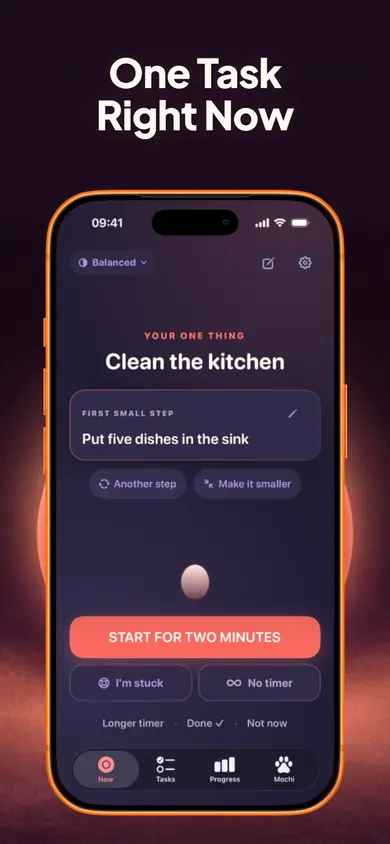
You open Now and type Quarterly report. The suggested first step still feels big, so you edit it to: Open last quarter's file and copy the headings. Start for two minutes. At 1:10 the headings are in. At 2:00 the ring ends and you are halfway through the first table, so you pick 25 minutes and keep going.
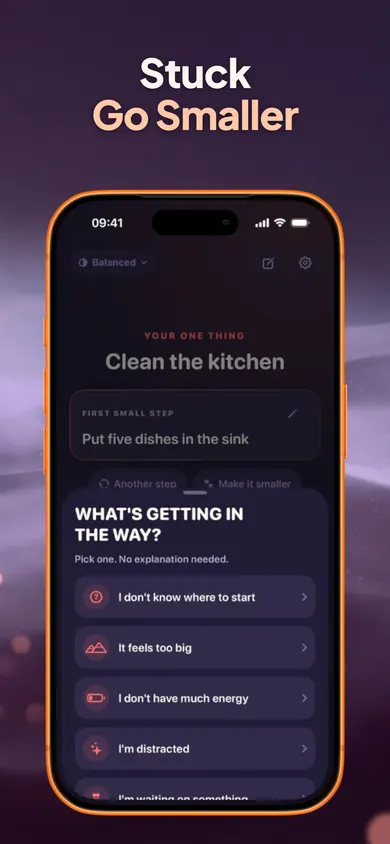
On Thursday it goes worse. You tap I'm stuck, choose low energy, and settle for the tiniest version you can think of: rename the file. It counts. The Progress tab shows two-minute starts as well as finished tasks, so Thursday is not a zero.
Ways to start working from home, compared
What each one needs from you before the first minute of work. Focusmate details checked on its own site in November 2026.
To-do list app
Needs: a list you keep up to date.
Good at: remembering everything.
Weak at: choosing one thing to begin.
Pomodoro timer
Needs: a 25-minute commitment.
Good at: keeping going once started.
Weak at: days when 25 minutes feels like a mountain.
Focusmate
Needs: a booked time and camera on.
Good at: gentle accountability.
Cost: free for 3 sessions a week; Plus from $8 a month billed yearly.
Now (we make it)
Needs: one task and two minutes.
Good at: the first step, and getting unstuck mid-way.
Weak at: team work, laptop blocking.
Remote work and starting: questions
Why can't I start working when I work from home?
Home removes the cues that used to start your day for you: the commute, colleagues arriving, a desk that only means work. What is left is a task you have to begin on your own, and if it feels unpleasant or vague it is easy to delay. A 2007 meta-analysis in Psychological Bulletin found task aversiveness and task delay among the strongest, most consistent predictors of procrastination.
What is the fastest way to start work when I'm stuck?
Pick the task, write the smallest physical first action (open the document, type the heading), and commit to two minutes only. Stopping after two minutes is allowed. Starting is the part you are solving, not finishing.
Is it laziness if I can't start work at home?
Not necessarily. Starting is its own skill and it gets harder when a task is vague, unpleasant or far from its deadline. If the struggle is long-standing and affects many parts of life, it is worth talking to a clinician; this page does not diagnose anything.
Does body doubling help remote workers?
Many people find working alongside someone helps. Focusmate pairs you with a stranger on video for 25, 50 or 75 minutes; it is free for up to three sessions a week. It needs a camera on and a booked time, which does not suit every morning.
Should I use a to-do list or a timer?
Both have a place, but a long list can make starting harder because every item competes. Now keeps a daily plan of three: one main, one smaller, one optional bonus, with everything else in a parking lot.
Is Now free?
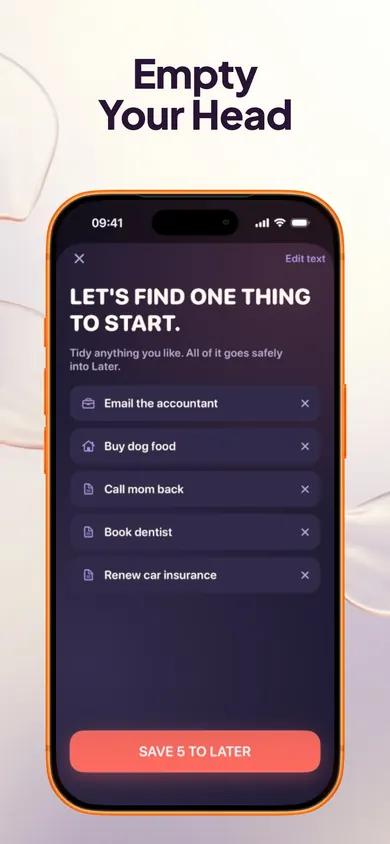
The one-task screen, two-minute starter, Stuck button, task breakdown, unlimited tasks, Brain Dump, focus timers, daily plan and parking lot are free forever. Now Pro ($4.99 a month, $29.99 a year or $59.99 lifetime in the US) adds routines, full Time Mirror history and task history export.
Does Now work on my work laptop?
No. Now is an iPhone app. Many remote workers keep the phone beside the laptop as the starter, then do the work on the computer.
Start on your iPhone
Tomorrow at your desk: one task, one smaller step, two minutes. Free, no account.

Now on the App Store · Updated November 2026
Related
- Now: one task, one small step, two minutesNow shows one task, one concrete first step and a two-minute timer. Tap I'm stuck to go smaller. Free on iPhone, no account.
- ADHD cleaning app: a first week of two-minute startsLooking for an ADHD cleaning app? Play the 20-second version, then follow a 7-day plan of two-minute starts for the room you keep avoiding.
- Why can't I start tasks I want to do?Wanting to do it and starting it are different skills. Tap what's in your way for one next move, then read 12 straight answers. No account needed.
- ADHD mom printable to-do list: free 2-page PDFA free printable to-do list for moms who find starting hard: 3 tasks max, a parking lot, and 24 first-step cards for the fridge. No email needed.